

Headings are one of the simplest ways to organize an SEO article.
If a page contains a lot of information without clear sections, readers can quickly become overwhelmed.
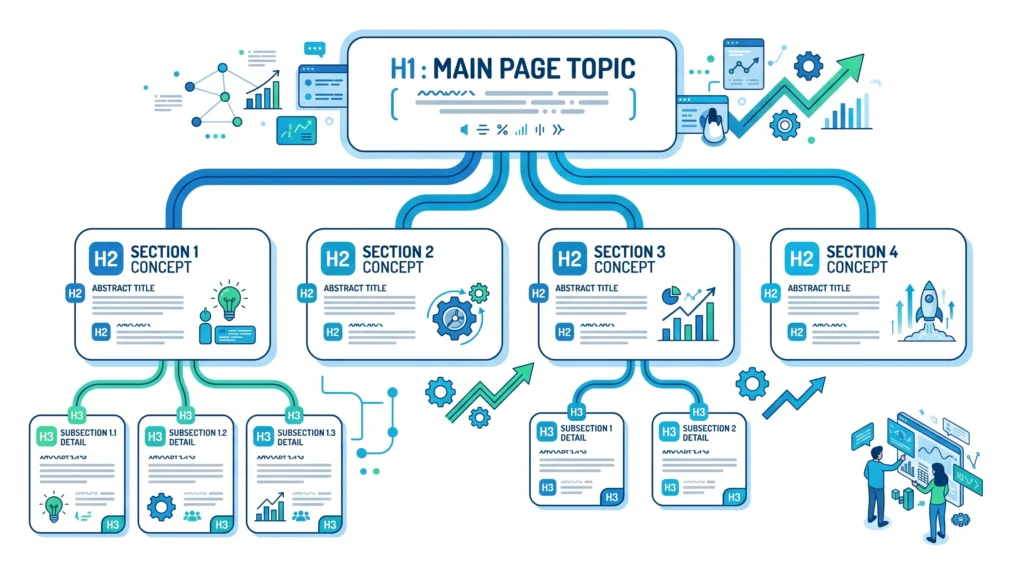
H1, H2, and H3 headings create a logical structure that helps readers scan the page and understand how different sections relate to one another.

What Are SEO Headings?
SEO headings are headings used to organize webpage content into logical sections.
The most common HTML heading levels are:
- H1 — Main page heading
- H2 — Major section
- H3 — Subsection
- H4 — Subsection under an H3
- H5 — Further subsection
- H6 — Lowest heading level
For most blog articles, H1, H2, and H3 are enough to create a clear structure.
For example:
H1 — What Is SEO?
H2 — How Does SEO Work?
H2 — Why Is SEO Important?
H3 — Benefits of SEO
H3 — Common SEO Challenges
This creates a logical hierarchy.
What Is an H1 Heading?
The H1 is the main heading that identifies the primary topic of a page.
For example:
H1 — SEO Headings: H1, H2 and H3 Explained
This tells the reader what the entire article is about.
A good H1 should be:
- Clear
- Relevant
- Specific
- Easy to understand
- Closely aligned with the page topic
Avoid creating a vague H1 that doesn’t tell readers what they will learn.

What Is an H2 Heading?
H2 headings divide the main topic into major sections.
For this article, examples include:
H2 — What Are SEO Headings?
H2 — What Is an H1 Heading?
H2 — What Is an H2 Heading?
H2 — What Is an H3 Heading?
Each H2 represents an important part of the overall topic.
H2 headings make long content easier to scan and navigate.
What Is an H3 Heading?
H3 headings are used for subsections within an H2 section.
For example:
H2 — Why Are SEO Headings Important?
H3 — They Improve Readability
H3 — They Organize Information
H3 — They Help Users Scan Content
The H3 headings provide additional structure underneath the main H2 topic.
Why Are H1, H2 and H3 Headings Important?
Headings help both readers and search engines understand the structure and topics covered on a page.
They can help:
- Improve readability
- Make content easier to scan
- Organize complex information
- Clarify relationships between topics
- Improve navigation
- Create a better user experience
Headings are not a magic ranking trick.
Their main purpose is to create a clear and logical content structure.
H1 vs H2 vs H3: What’s the Difference?
| Heading | Main Purpose | Example |
|---|---|---|
| H1 | Main topic of the page | SEO Headings Explained |
| H2 | Major section | What Is an H1 Heading? |
| H3 | Subsection within an H2 | How to Write a Good H1 |
| H4 | Subsection within an H3 | H1 Examples |
Think of it like a book:
H1 = Book title
H2 = Chapter
H3 = Section inside the chapter
H4 = Subsection
This simple mental model makes heading hierarchy much easier to understand.
How to Structure H1, H2 and H3 Correctly
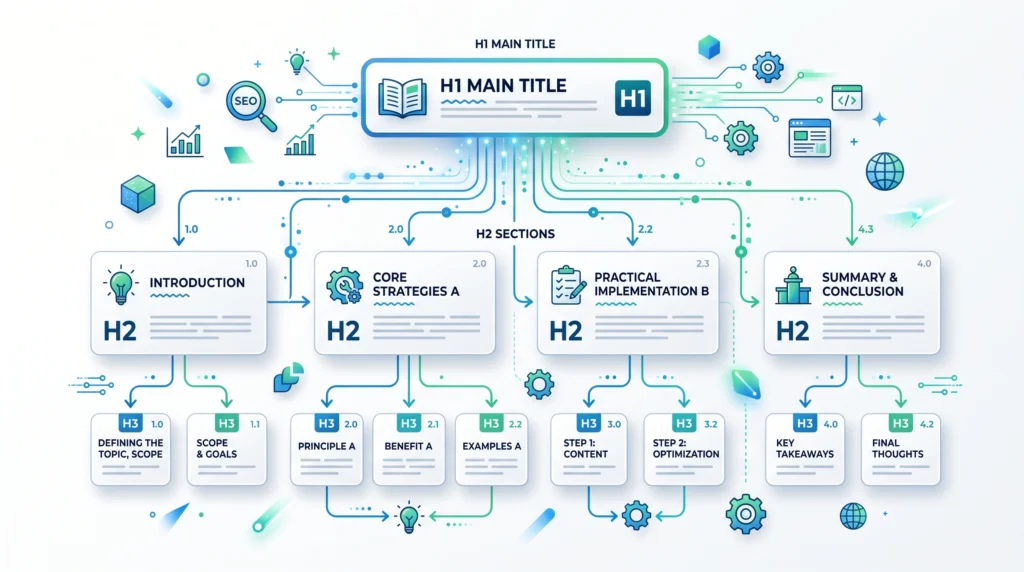
A simple structure might look like this:
H1 — What Is SEO?
↓
H2 — How Does SEO Work?
↓
H3 — Crawling
H3 — Indexing
H3 — Ranking
↓
H2 — Why Is SEO Important?
↓
H3 — Organic Traffic
H3 — Brand Visibility
↓
H2 — How to Start SEO
This structure creates a logical flow from the main topic to major sections and supporting details.
How Many H1 Headings Should a Page Have?
The most important thing is that the page has a clear primary heading representing its main topic.
For a straightforward article, using one clear H1 is the simplest approach.
For example:
H1 — What Is Keyword Research?
Then organize the rest of the article using H2 and H3 headings.
Don’t create multiple H1 headings simply because you want to target multiple keywords.
The page should have one clear primary topic.
Can You Use Multiple H2 and H3 Headings?
Yes.
There is no need to limit yourself to one H2 or one H3.
A long article may contain several H2 sections, with multiple H3 subsections under them.
For example:
H1 — Complete SEO Guide
H2 — SEO Basics
H3 — What Is SEO?
H3 — How Search Engines Work
H2 — Keyword Research
H3 — What Is Keyword Research?
H3 — Search Intent
H2 — On-Page SEO
H3 — SEO Titles
H3 — Internal Linking
The important thing is that the structure remains logical.
Should Keywords Be Used in Headings?
Relevant keywords can naturally appear in headings when they accurately describe the section.
For example:
H2 — What Is Keyword Research?
is useful when the section actually explains keyword research.
However, don’t force keywords into every heading.
A heading should primarily help the reader understand what the section contains.
Natural relevance is more important than repetition.
SEO Headings and Search Intent
Your headings should reflect the questions and topics that matter to your audience.
For example, someone searching:
“How to do keyword research”
may expect sections such as:
H2 — What Is Keyword Research?
H2 — How to Find Keywords
H2 — How to Analyze Keywords
H2 — Common Keyword Research Mistakes
These headings make the article easier to follow because they reflect the user’s likely questions.
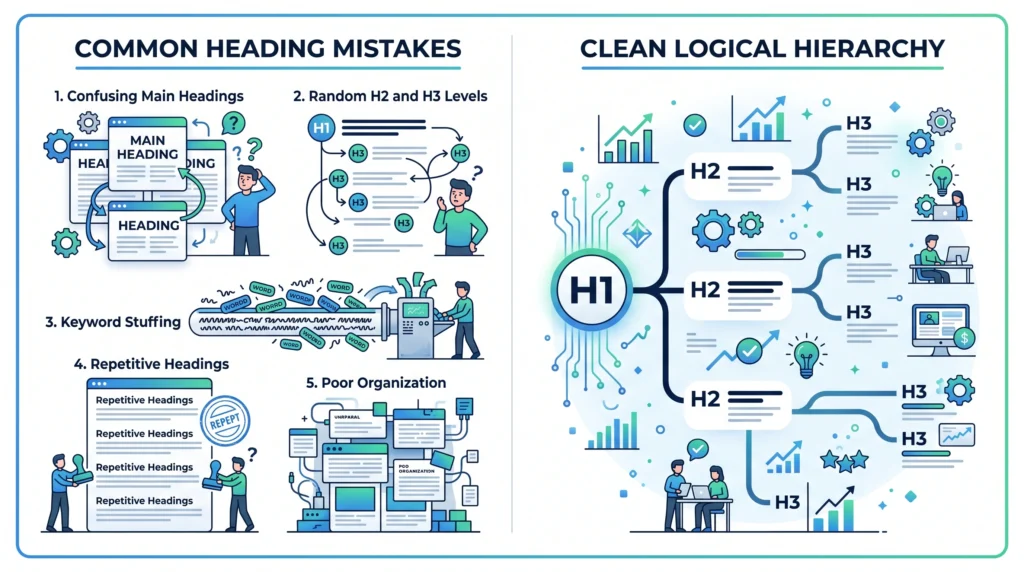
Common SEO Heading Mistakes
Using Headings Only for Styling
Don’t use heading tags simply because they make text look bigger.
Use headings to represent actual content structure.
Skipping Logical Structure
Avoid creating a confusing hierarchy such as:
H1 → H3 → H2 → H4
unless there is a legitimate structural reason.
Keyword Stuffing
Don’t repeat the same keyword unnaturally across every heading.
Writing Vague Headings
Headings should give readers a clear idea of what the section contains.
Making Every Sentence a Heading
Not every sentence or paragraph needs a heading.
Use headings where they improve organization.
SEO Headings Best Practices
Follow these simple rules:
- Use a clear primary H1
- Use H2 for major sections
- Use H3 for supporting subsections
- Keep headings descriptive
- Make headings useful to readers
- Include relevant keywords naturally
- Maintain a logical hierarchy
- Don’t stuff keywords
- Don’t use headings purely for visual styling
- Break up long sections when necessary
SEO Headings Example
Here’s a simple example for an article about SEO:
H1 — What Is SEO? The Ultimate Beginner’s Guide
H2 — What Is SEO?
H2 — How Do Search Engines Work?
H3 — Crawling
H3 — Indexing
H3 — Ranking
H2 — Why Is SEO Important?
H3 — Organic Traffic
H3 — Search Visibility
H2 — How to Start SEO
H3 — Keyword Research
H3 — On-Page SEO
H3 — Technical SEO
This structure makes the article easy to navigate and understand.
SEO Headings Checklist
Before publishing an article, check:
- The page has a clear main heading
- H1 represents the primary topic
- H2 headings divide major sections
- H3 headings support specific H2 sections
- Heading hierarchy is logical
- Headings are descriptive
- Keywords are used naturally
- No keyword stuffing
- No unnecessary headings
- Headings match the content below them
- The structure is easy to scan
- The headings reflect search intent
Frequently Asked Questions
What Is an H1 Heading?
An H1 is the primary heading that represents the main topic of a webpage.
What Is an H2 Heading?
An H2 is a major section heading used to divide the main topic into important sections.
What Is an H3 Heading?
An H3 is a subsection heading that provides additional structure within an H2 section.
How Many H1 Headings Should a Page Have?
For a straightforward article, one clear H1 representing the primary topic is the simplest and most understandable approach.
Can I Use Multiple H2 Headings?
Yes. You can use multiple H2 headings to organize different major sections of a page.
Should Keywords Be Included in H1 and H2 Headings?
Relevant keywords can be included naturally when they accurately describe the content. Avoid forcing keywords into headings.
Do H2 and H3 Headings Improve SEO Rankings?
Headings help organize content and make it easier for users and search engines to understand the page. However, headings alone do not guarantee higher rankings.
Final Thoughts
SEO headings are simple, but they play an important role in creating well-structured content.
Remember the basic hierarchy:
H1 → Main Topic
H2 → Major Section
H3 → Subsection
The goal isn’t to use as many headings as possible.
The goal is to create a structure that helps readers quickly understand your content.
Use headings naturally, keep the hierarchy logical, and make every heading meaningful.
When your content is well organized, readers can find what they need faster—and your webpage becomes easier to understand and navigate.
Related Articles
Article 9:
What Is On-Page SEO?what-is-on-page-seo
Article 10:
How to Optimize SEO Titles and Meta Descriptionsseo-title-meta-description
Article 12:
Internal Linking: Complete SEO Guideinternal-linking
Pillar 2 — Keyword Research:keyword-research
Internal Linking Suggestions
Use natural anchor text such as:
- on-page SEO
- SEO titles and meta descriptions
- keyword research
- search intent
- internal linking
- long-tail keywords
Link this article back to the Pillar 3 — On-Page SEO page and naturally connect it with Articles 9, 10, and 12.
Publishing Checklist
- H1 clearly labelled
- H2 headings clearly labelled
- H3 headings clearly labelled
- SEO title prepared
- Meta title prepared
- Meta description prepared
- URL slug prepared
- Focus keyword included naturally
- Secondary keywords used naturally
- Positive words included naturally
- Caution words included naturally
- H1 explained
- H2 explained
- H3 explained
- Heading hierarchy explained
- Examples included
- Common mistakes included
- Best practices included
- Checklist included
- FAQs included
- Image placements marked
- Image prompts included
- Image filenames included
- Alt text included
- Internal linking suggestions included
- No keyword stuffing
- No ranking guarantees
- Beginner-friendly language used
- Content is easy to scan
