

Internal linking is one of the most useful on-page SEO techniques for organizing a website.
It connects one page on your website to another page on the same website.
For example, an article about keyword research might link to another article about search intent.
These connections help readers discover related information and help search engines understand how different pages on your website are connected.

What Is Internal Linking?
Internal linking is the practice of linking from one page of your website to another page on the same website.
For example:
An article about On-Page SEO can link to:
- SEO headings
- SEO titles and meta descriptions
- Keyword research
- Search intent
- Internal linking
These links create relationships between your content.
In simple terms:
Internal links help users and search engines move from one relevant page to another.
Why Is Internal Linking Important for SEO?
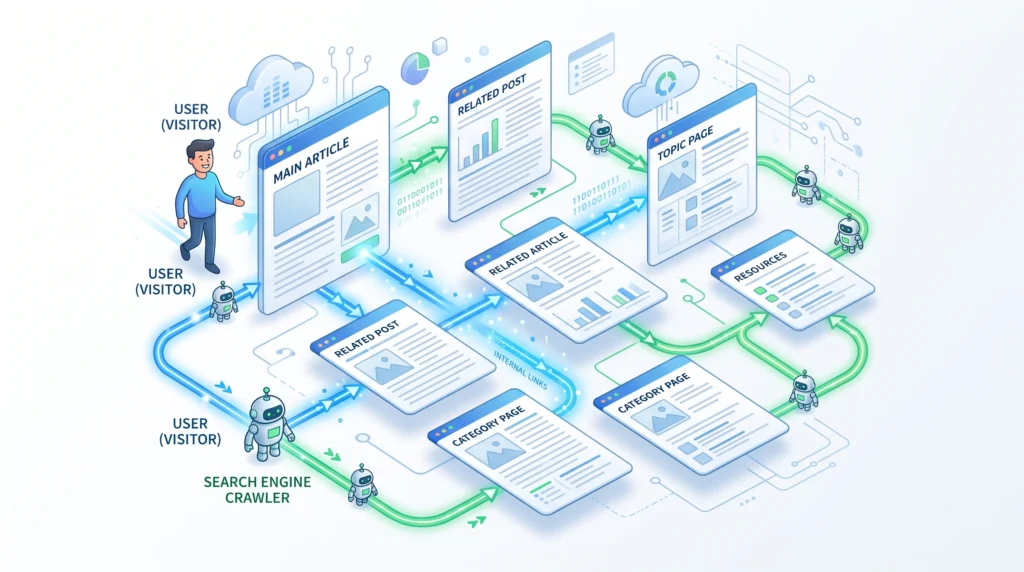
Internal linking can support several important aspects of SEO.
Helps Users Discover Related Content
A useful internal link can take readers to another page that answers a related question.
This keeps the visitor within your website and makes it easier to explore the topic.
Helps Search Engines Discover Pages
Internal links provide paths that search engines can use to discover and crawl pages.
A strong internal linking structure can make important content easier to find.
Helps Explain Content Relationships
Links can help communicate that two pages are related.
For example:
Keyword Research → Search Intent → Long-Tail Keywords
These pages naturally belong to the same broader topic.
Helps Distribute Internal Authority
Internal links can help distribute signals throughout your website.
This is one reason a thoughtful internal linking strategy is useful when building a site’s overall structure.
How Do Internal Links Work?
Imagine your website as a city.
Each webpage is a building.
Internal links are the roads connecting those buildings.
If important buildings have no roads leading to them, they can become difficult for visitors and search engines to reach.
A well-connected website creates clearer pathways.
For example:
Pillar Page
↓
Keyword Research
↓
Search Intent
↓
Long-Tail Keywords
Each page supports the broader topic while providing a path to related information.
Internal Links vs External Links
Internal and external links are different.
| Link Type | Destination |
|---|---|
| Internal Link | Another page on the same website |
| External Link | A page on another website |
Example of an Internal Link
yourwebsite.com/keyword-research
linking to:
yourwebsite.com/search-intent
Example of an External Link
Your website linking to an authoritative resource on another domain.
Both types of links can be useful, but they serve different purposes.
Types of Internal Links
There are several ways internal links can appear on a website.
Contextual Links
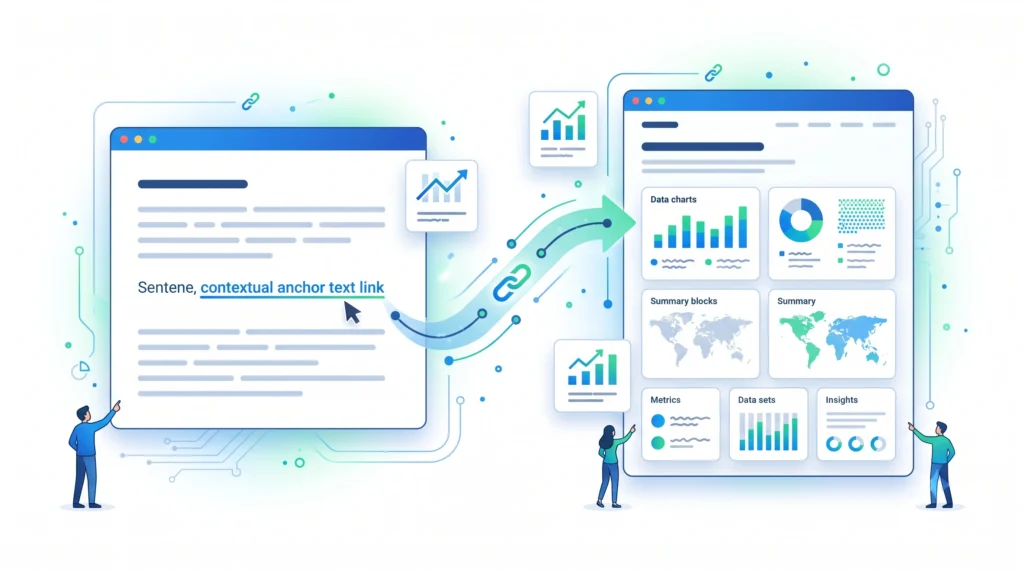
These are links placed naturally inside the main content.
Example:
Before creating content, understanding search intent can help you choose the right topic and structure.
Contextual links are often particularly useful because they appear where the topic is directly relevant.
Navigation Links
These appear in menus and navigation areas.
For example:
Home → SEO → Keyword Research → On-Page SEO
Navigation helps visitors move around the website.
Breadcrumb Links
Breadcrumbs show where a page sits within the website hierarchy.
Example:
Home → SEO → On-Page SEO → Internal Linking
They can make navigation easier, especially on larger websites.
Related Content Links
These links connect an article with other relevant articles.
For example:
Related Articles
- What Is On-Page SEO?
- SEO Headings
- SEO Titles and Meta Descriptions
What Is an Anchor Text?
Anchor text is the clickable text used for a hyperlink.
For example:
Learn more about keyword research.
Here, keyword research is the anchor text.
Good anchor text should give readers a reasonable idea of what they will find after clicking.
How to Choose Good Anchor Text
Good anchor text should be:
- Descriptive
- Relevant
- Natural
- Concise
- Useful to the reader
For example:
Weak:
Click here
Better:
Learn how to do keyword research
The second option provides more context about the destination page.
However, don’t force exact-match keywords into every internal link.
Natural language is usually better.
How to Create an Internal Linking Strategy
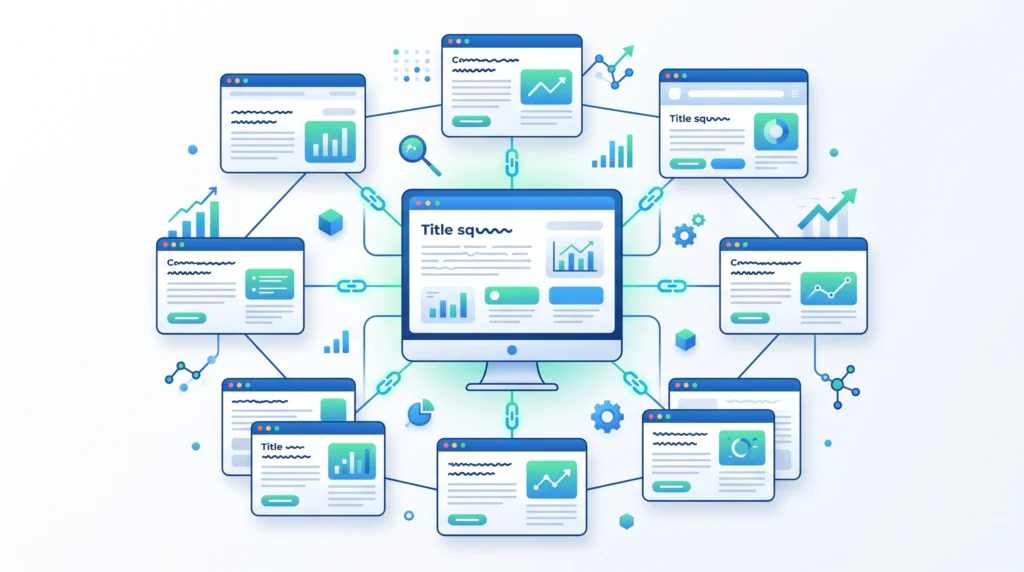
A simple internal linking strategy can follow these steps.
Step 1: Identify Your Important Pages
Start by identifying pages that are important to your SEO strategy.
These might include:
- Pillar pages
- Service pages
- Product pages
- High-value guides
- Important category pages
Step 2: Group Related Content
Organize pages into related topics.
For example:
SEO
→ Keyword Research
→ Search Intent
→ Long-Tail Keywords
→ On-Page SEO
→ Technical SEO
This helps you identify natural linking opportunities.
Step 3: Find Relevant Linking Opportunities
When updating an article, look for places where another page genuinely adds useful information.
For example, while discussing keyword research, you could link to a detailed article about search intent.
Step 4: Use Descriptive Anchor Text
Choose anchor text that clearly communicates the destination.
Step 5: Review Your Internal Links Regularly
As your website grows, new pages and old links can create opportunities for improvement.
Review your internal linking structure periodically.
Pillar Pages and Supporting Content
Internal linking becomes especially powerful when used with a pillar-and-cluster content structure.
For example:
Pillar Page — On-Page SEO
↓
Article 9 — What Is On-Page SEO?
↓
Article 10 — SEO Titles and Meta Descriptions
↓
Article 11 — SEO Headings
↓
Article 12 — Internal Linking
These pages can link naturally to one another where relevant.
This creates a connected content ecosystem rather than a collection of isolated articles.
How Many Internal Links Should a Page Have?
There is no universal number of internal links that every page should contain.
The right number depends on:
- Content length
- Topic complexity
- Number of related pages
- Website structure
- User needs
Instead of asking:
“How many links should I add?”
ask:
“Which links would genuinely help the reader?”
Quality and relevance are more important than hitting an arbitrary number.
Where Should You Place Internal Links?
Internal links can appear wherever they naturally help the user.
Good opportunities include:
- Within relevant paragraphs
- After introducing a related concept
- In resource sections
- In related article sections
- In navigation
- In breadcrumbs
Contextual links are particularly useful when the surrounding text explains why the destination page is relevant.
Common Internal Linking Mistakes
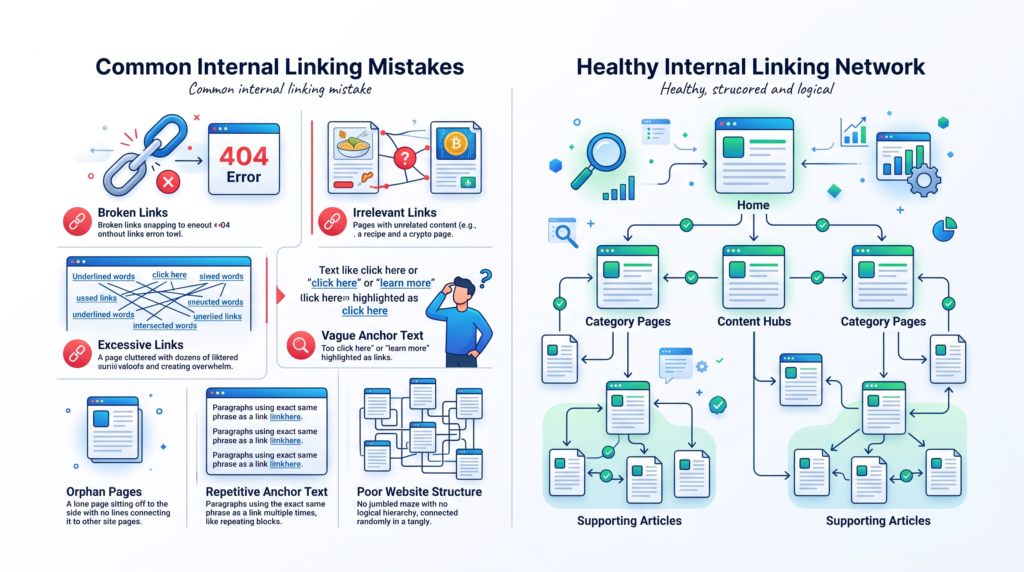
Linking to Irrelevant Pages
Don’t add a link simply because a page exists.
The destination should be genuinely related to the surrounding content.
Using “Click Here” Everywhere
Generic anchor text provides little context.
Use descriptive wording where appropriate.
Adding Too Many Links
More links don’t automatically mean better SEO.
Too many links can make a page difficult to read and reduce the usefulness of individual links.
Ignoring Orphan Pages
An orphan page has few or no internal links pointing to it.
Important pages should generally have sensible pathways from other relevant pages.
Using the Same Anchor Text Unnaturally
Avoid forcing the exact same phrase into every internal link.
Use natural variations when they accurately describe the destination.
Creating Broken Internal Links
Broken links create a poor experience and should be fixed when discovered.
What Are Orphan Pages?
An orphan page is a webpage that has no meaningful internal links pointing to it from other pages on the website.
This can make the page harder for users to discover and can also make crawling and content discovery less efficient.
For important pages, make sure there are relevant pathways leading to them.
Internal Linking and User Experience
Internal linking isn’t only about SEO.
It can also improve the reader’s experience.
Imagine you’re reading an article about SEO titles and the article mentions search intent.
A useful internal link allows you to explore search intent immediately instead of searching for another article yourself.
That’s a better experience.
The best internal links answer the reader’s likely next question.
Internal Linking Checklist
Before publishing an article, check:
- Important related pages are linked
- Links are relevant
- Anchor text is descriptive
- Links appear naturally within the content
- No broken internal links exist
- Important pages aren’t isolated
- Links help readers discover related content
- No excessive linking
- No unnecessary repetition
- Pillar and supporting pages are connected where relevant
- Navigation and breadcrumbs are logical
Frequently Asked Questions
What Is Internal Linking in SEO?
Internal linking is the practice of linking from one page on a website to another page on the same website.
Why Is Internal Linking Important?
Internal linking helps users discover related content and can help search engines discover pages and understand relationships between content.
What Is Anchor Text?
Anchor text is the clickable text used for a hyperlink.
How Many Internal Links Should an Article Have?
There is no fixed ideal number. Add internal links when they are relevant and genuinely useful to the reader.
What Is an Orphan Page?
An orphan page is a page that has no meaningful internal links pointing to it from other pages on the website.
Should Every Page Have Internal Links?
Important pages should generally be connected to other relevant pages through a logical website structure.
Are Internal Links a Ranking Factor?
Internal links help search engines discover and understand relationships between pages. They are an important part of website architecture and SEO, but they do not guarantee rankings.
Should Internal Links Use Exact-Match Keywords?
Not necessarily. Anchor text should be descriptive and natural. Avoid forcing exact-match keywords into every internal link.
Final Thoughts
Internal linking is one of the simplest ways to create a better-connected website.
A strong strategy isn’t about adding links everywhere.
It’s about creating useful connections between relevant pages.
Remember the basic process:
Create Helpful Content
↓
Group Related Topics
↓
Identify Important Pages
↓
Add Relevant Internal Links
↓
Use Descriptive Anchor Text
↓
Review Your Website Structure
↓
Fix Broken or Missing Links
When internal links are planned around user needs and content relationships, they can make your website easier to navigate and provide search engines with clearer pathways through your content.
Related Articles
Article 9:
What Is On-Page SEO?what-is-on-page-seo
Article 10:
How to Optimize SEO Titles and Meta Descriptionsseo-title-meta-description
Article 11:
SEO Headings: H1, H2 and H3 Explainedseo-headings
Pillar 2 — Keyword Research:
Keyword Research
Internal Linking Suggestions
For this article, naturally link to:
- What Is On-Page SEO?
- SEO Titles and Meta Descriptions
- SEO Headings
- Keyword Research
- Search Intent
- Long-Tail Keywords
Recommended contextual anchor text:
- on-page SEO
- SEO titles and meta descriptions
- SEO headings
- keyword research
- search intent
- long-tail keywords
Also link this article back to the main Pillar 3 — On-Page SEO page.
Publishing Checklist
- H1 clearly labelled
- H2 headings clearly labelled
- H3 headings clearly labelled
- SEO title prepared
- Meta title prepared
- Meta description prepared
- URL slug prepared
- Focus keyword included naturally
- Secondary keywords used naturally
- Positive words included naturally
- Caution words included naturally
- Internal linking explained
- Internal vs external links explained
- Anchor text explained
- Internal linking strategy included
- Pillar and supporting content explained
- Orphan pages explained
- Common mistakes included
- Checklist included
- FAQs included
- Image placements marked
- Image prompts included
- Image filenames included
- Alt text included
- Internal linking suggestions included
- No keyword stuffing
- No guaranteed ranking claims
- Beginner-friendly language used
- Content is easy to scan
