

Technical SEO is the process of improving the technical foundation of a website so search engines can more effectively crawl, understand, index, and access its important pages.
Unlike content-focused SEO, technical SEO deals primarily with how a website is built, structured, and delivered.
Technical SEO can include areas such as:
- Crawling
- Indexing
- Site architecture
- XML sitemaps
- Robots directives
- Page speed and performance
- Mobile usability
- HTTPS security
- Duplicate content management
- Structured data
- Broken pages and redirects
In simple terms:
Technical SEO helps make sure that search engines and users can properly access, understand, and use your website.
Even excellent content can face problems if search engines cannot discover important pages or if the website has major technical issues.

What Does Technical SEO Mean?
Technical SEO focuses on the behind-the-scenes elements that support a website’s visibility in search engines.
Imagine a website as a building.
The content is what people see inside the building.
Technical SEO is the foundation, structure, entrances, signs, and pathways that help people and search engines access the right places.
If the technical foundation is weak, problems may include:
- Important pages not being discovered
- Pages not being indexed
- Slow loading experiences
- Broken links
- Duplicate pages
- Poor mobile usability
- Confusing website structure
Technical SEO helps identify and improve these issues.
Why Is Technical SEO Important?
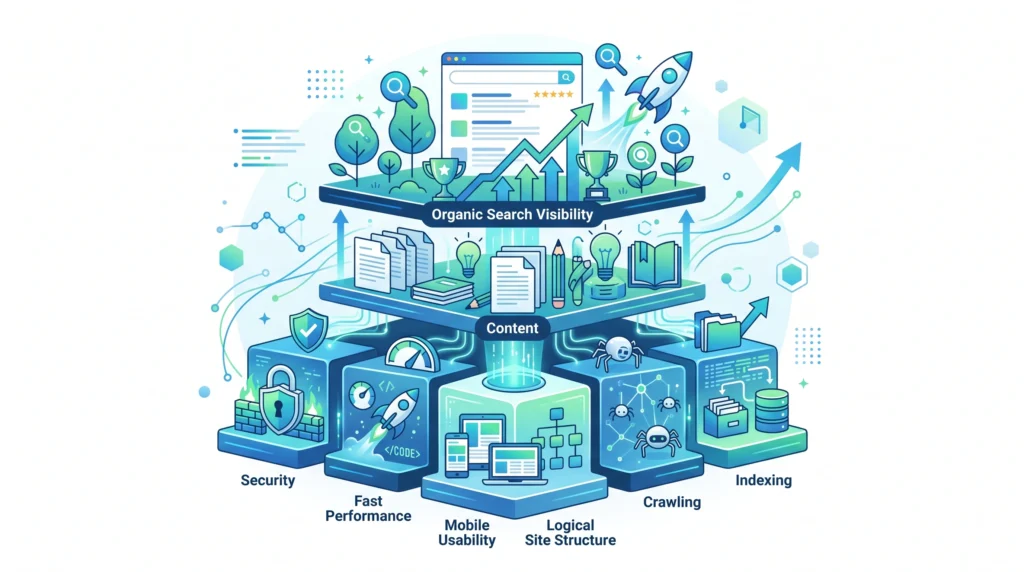
Technical SEO is important because search engines need to access and process your website before your pages can have the opportunity to appear in relevant search results.
A strong technical foundation can help:
- Search engines discover important pages
- Improve crawl efficiency
- Support proper indexing
- Create a better user experience
- Improve website performance
- Support mobile visitors
- Reduce technical errors
- Organize content logically
Technical SEO does not guarantee rankings.
However, unresolved technical problems can prevent otherwise useful content from performing as expected.
How Technical SEO Works
A simplified version of the technical SEO process looks like this:
Website Structure
↓
Search Engines Discover Pages
↓
Pages Are Crawled
↓
Content Is Processed and Understood
↓
Eligible Pages May Be Indexed
↓
Pages Can Be Considered for Relevant Search Results
Technical SEO helps improve each part of this process.
Discovery
Search engines discover pages through methods such as internal links and XML sitemaps.
Crawling
Search engine bots request and process webpages.
Rendering
Modern webpages may require browsers or search engines to process scripts and other resources before the complete page can be understood.
Indexing
Search engines analyze pages and may add eligible content to their index.
Ranking
Indexed pages can then be considered for relevant searches.
Crawling Explained
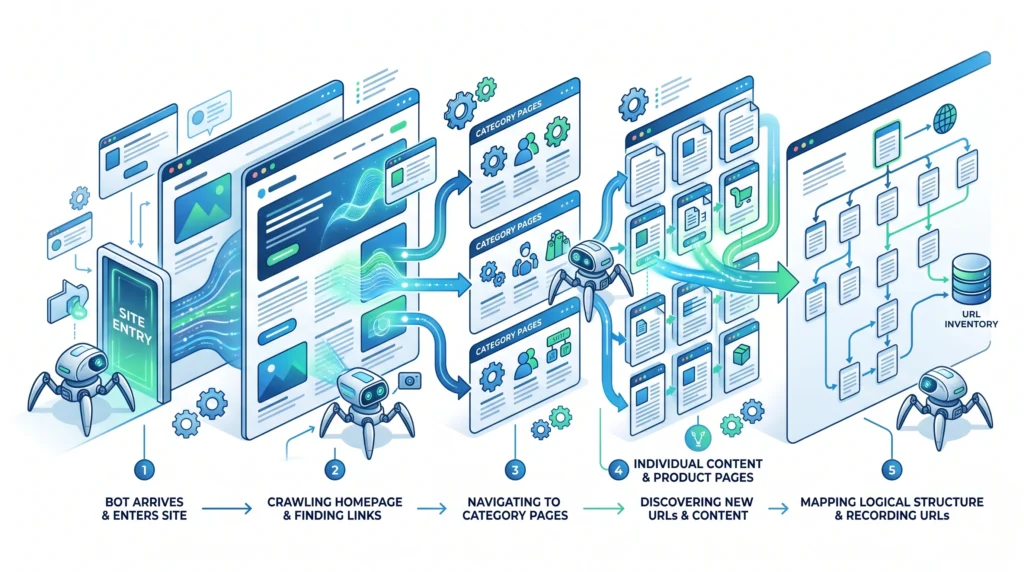
Crawling is the process through which search engine bots discover and request webpages.
A search engine may discover pages through:
- Internal links
- External links
- XML sitemaps
- Previously known URLs
Good internal linking and a logical website structure can make it easier to discover important pages.
Problems can occur when important content is isolated and has no clear links pointing to it.
What Is Indexing?
Indexing refers to the process of analyzing and potentially storing a webpage in a search engine’s index.
Being crawled does not automatically mean a page will be indexed.
A search engine may decide not to index a page for various reasons.
Potential issues can include:
- Duplicate or very similar content
- Low-value pages
- Incorrect technical directives
- Blocked resources
- Canonicalization problems
- Pages with limited usefulness
The goal is not to force every URL on a website into an index.
Instead, focus on making sure your important, useful pages can be properly accessed and understood.
XML Sitemaps
An XML sitemap is a file that provides search engines with information about important URLs on a website.
A sitemap can help search engines discover pages, especially on larger or more complex websites.
However, an XML sitemap is not a guarantee that every listed page will be crawled or indexed.
A useful sitemap should generally focus on URLs that are:
- Important
- Canonical
- Accessible
- Intended for indexing
Avoid treating a sitemap as a replacement for good internal linking.
Robots.txt and Robots Directives
Robots-related controls can provide instructions about how search engine crawlers interact with parts of a website.
For example, website owners may use controls to manage crawling of certain areas.
However, these directives should be handled carefully.
Incorrect configurations can accidentally restrict access to important content.
Technical SEO requires understanding the difference between:
- Allowing or restricting crawling
- Allowing or preventing indexing
- Managing duplicate versions of content
These concepts are related but not identical.
Website Architecture
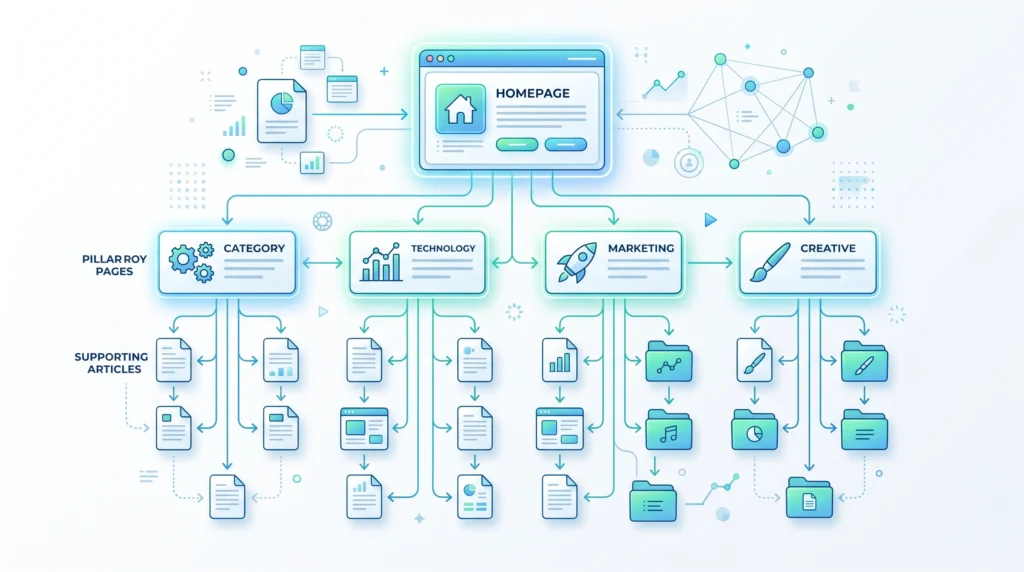
Website architecture is the way pages are organized and connected.
A logical structure can help:
- Users navigate the website
- Search engines discover content
- Related topics stay organized
- Important pages receive internal links
For example:
Homepage
↓
SEO Basics
↓
Keyword Research
↓
What Is Keyword Research?
A clear structure is generally easier to understand than a collection of isolated pages with no meaningful relationships.
H2 — Page Speed and Website Performance
Website performance is another important technical consideration.
Slow or poorly optimized pages can create a frustrating user experience.
Factors that can affect performance include:
- Large image files
- Unoptimized code
- Excessive scripts
- Slow server response
- Unnecessary resources
- Poor caching configuration
Performance optimization may involve:
- Compressing images
- Reducing unnecessary code
- Optimizing scripts
- Improving server response
- Using efficient caching
- Loading resources appropriately
The goal is not to chase a perfect score.
The goal is to create a fast, stable, and usable experience.
Mobile-Friendly SEO

Many users access websites through mobile devices.
A technically strong website should provide a usable experience across different screen sizes.
Consider:
- Responsive design
- Readable text
- Easy navigation
- Proper spacing
- Accessible buttons
- Fast loading
A website that works well only on desktop can create unnecessary problems for mobile visitors.
HTTPS and Website Security
HTTPS helps secure the connection between a user’s browser and a website.
A website should generally use HTTPS to provide a secure browsing experience.
Technical SEO may involve checking:
- Whether HTTPS is properly implemented
- Whether HTTP versions redirect correctly
- Whether mixed content problems exist
- Whether canonical versions are consistent
Security and trust are important parts of maintaining a healthy website.
Duplicate Content and Canonical URLs
Duplicate or highly similar pages can make it more difficult to understand which version should be treated as the primary page.
For example, the same content might be available through multiple URLs.
Canonicalization helps communicate the preferred version of a page.
A canonical URL is not simply about fixing every duplicate page automatically.
It should be used thoughtfully as part of a broader website structure and URL management strategy.
Common causes of duplicate URLs can include:
- URL parameters
- HTTP and HTTPS versions
- WWW and non-WWW versions
- Trailing slash variations
- Similar category pages
- Filtered or sorted pages
Structured Data
Structured data is a standardized format that can provide additional information about the content of a page.
For example, structured data may help describe:
- Articles
- Products
- Organizations
- Events
- Recipes
- Breadcrumbs
Structured data should accurately represent the visible content of the page.
Adding structured data does not guarantee enhanced search appearances.
However, valid and relevant structured data can help search engines better understand certain types of information.
Broken Links and Redirects
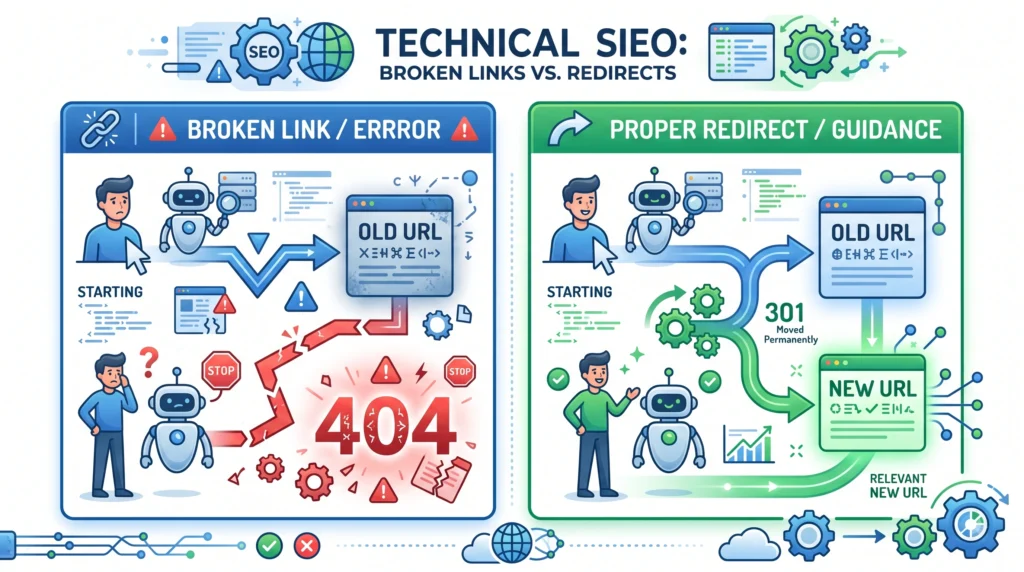
Broken links can create poor experiences for users.
When pages are moved or removed, it may be appropriate to redirect old URLs to relevant replacement pages.
A redirect should make sense for the user.
Avoid sending every removed page to an unrelated page simply to prevent an error.
Regularly checking for:
- Broken internal links
- Important missing pages
- Incorrect redirects
- Redirect chains
can help maintain a healthier website.
Core Technical SEO Elements
A beginner-friendly technical SEO checklist includes:
Crawlability
Can search engines access important pages?
Indexability
Are important pages eligible to be indexed?
Site Architecture
Are pages logically organized and connected?
XML Sitemap
Does the sitemap include important URLs?
Internal Linking
Can users and search engines discover related content?
Mobile Usability
Does the website work properly on mobile devices?
Website Performance
Do pages load efficiently and provide a stable experience?
HTTPS
Is the website securely accessible?
Canonicalization
Are preferred versions of pages clearly managed?
Structured Data
Is relevant structured information implemented accurately?
Common Technical SEO Mistakes
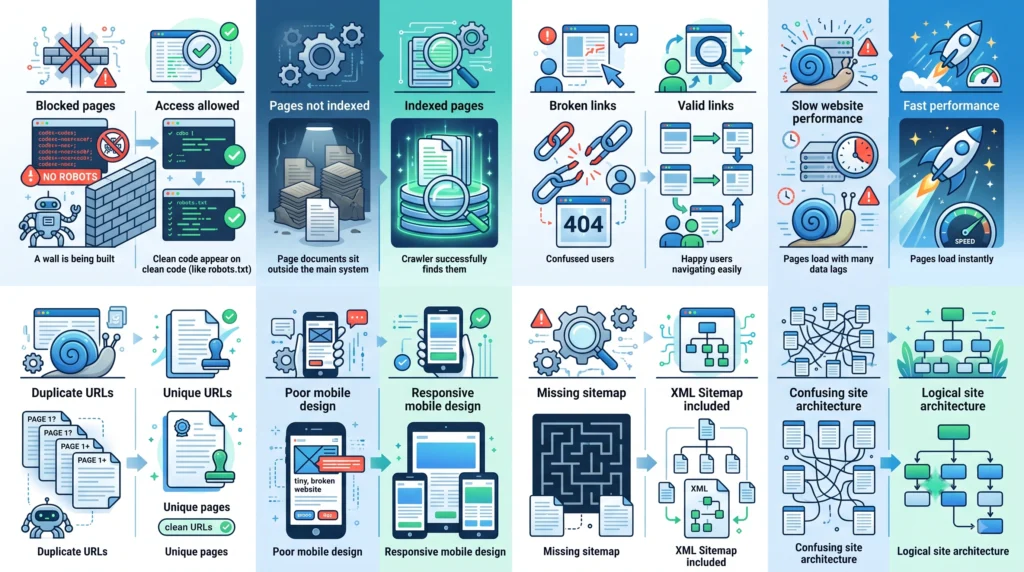
Accidentally Blocking Important Pages
Incorrect technical settings can prevent search engines from accessing important content.
Ignoring Indexing Problems
Publishing a page does not guarantee that it will appear in a search engine’s index.
Poor Website Structure
Important content should not be isolated.
Slow and Heavy Pages
Large files and unnecessary resources can reduce performance.
Duplicate URL Problems
Multiple versions of the same content can create unnecessary confusion.
Broken Internal Links
Links should be monitored and updated when pages change.
Ignoring Mobile Users
A poor mobile experience can affect a significant portion of your audience.
Using Structured Data Incorrectly
Structured data should accurately describe the page and follow relevant guidelines.
How to Start Technical SEO as a Beginner
You do not need to fix every possible technical issue at once.
Start with the fundamentals.
Step 1: Check Important Pages
Identify the pages that matter most to your website.
Step 2: Check Crawlability
Make sure search engines are not accidentally blocked from accessing important content.
Step 3: Review Indexing
Check whether important pages can be indexed.
Step 4: Improve Site Structure
Organize pages into logical categories and connect related content.
Step 5: Create or Review Your Sitemap
Make sure important canonical pages are represented appropriately.
Step 6: Improve Performance
Identify unnecessarily slow or heavy pages.
Step 7: Check Mobile Usability
Make sure the website works well across devices.
Step 8: Review HTTPS and URL Versions
Maintain a consistent and secure website version.
Step 9: Fix Broken Links
Update broken internal links and review redirects.
Step 10: Monitor Regularly
Technical SEO is an ongoing process.
Websites change, pages are added, and new technical issues can appear over time.
Technical SEO Checklist
Before considering your technical SEO foundation complete, review:
Crawling and Indexing
- Important pages are accessible
- Important pages are not accidentally blocked
- Important pages can be indexed where appropriate
- Unnecessary pages are managed appropriately
Website Structure
- Website navigation is logical
- Important pages receive internal links
- Related content is connected
- No important orphan pages
XML Sitemap
- Sitemap includes important canonical URLs
- Broken or unnecessary URLs are removed where appropriate
Performance
- Images are optimized
- Unnecessary resources are reduced
- Pages provide a reasonably fast experience
Mobile
- Website works on mobile devices
- Text is readable
- Navigation is usable
- Important content is accessible
URLs and Security
- HTTPS is implemented
- Preferred URL versions are managed consistently
- Canonical URLs are reviewed
Maintenance
- Broken links are monitored
- Redirects are reviewed
- Technical issues are checked regularly
Frequently Asked Questions
What Is Technical SEO in Simple Words?
Technical SEO is the process of improving a website’s technical structure so search engines can more easily crawl, understand, and access important pages.
Is Technical SEO Difficult?
Some technical SEO tasks can be complex, especially on large or highly customized websites. However, beginners can start with basic areas such as crawlability, indexing, site structure, mobile usability, and broken links.
Is Technical SEO Different From On-Page SEO?
Yes. On-page SEO focuses primarily on optimizing individual page elements such as content, titles, headings, and internal links. Technical SEO focuses more on the website’s infrastructure, accessibility, crawling, indexing, and performance.
Do I Need Technical SEO for a Small Website?
Yes, although a small website may have fewer technical issues to manage. Basic technical SEO helps ensure important pages can be discovered, accessed, and used properly.
What Is the Most Important Part of Technical SEO?
There is no single element that applies equally to every website. For beginners, ensuring important pages are crawlable, indexable, logically connected, secure, and usable provides a strong foundation.
Can Technical SEO Improve Rankings?
Technical improvements can help remove obstacles that affect crawling, indexing, performance, and usability. However, technical SEO alone does not guarantee higher rankings.
Final Thoughts
Technical SEO provides the foundation that supports your content and broader SEO strategy.
A useful way to think about it is:
Can search engines find my important pages?
↓
Can they access and process them?
↓
Can they understand which pages matter?
↓
Can users access those pages quickly and easily?
A strong technical SEO foundation includes:
Crawlability
Indexability
Logical Site Architecture
Fast Performance
Mobile Usability
HTTPS Security
Proper URL Management
Ongoing Maintenance
You do not need to become a developer to understand technical SEO fundamentals.
Start with the basics, identify the most important issues, and improve your website step by step.
Technical SEO is not about chasing a perfect website.
It is about removing unnecessary barriers so useful content can be discovered, accessed, and understood.
Related Articles
Pillar 1 — SEO Basics:
What Is SEO?what-is-seo
Pillar 3 — On-Page SEO:
What Is On-Page SEO?what-is-on-page-seo
Related Topic:
How Do Search Engines Work?how-do-search-engines-work
Related Topic:
Internal Linking: Complete SEO Guideinternal-linking
Internal Linking Suggestions
Naturally link this article to:
- What Is SEO?
- How Do Search Engines Work?
- What Is On-Page SEO?
- Internal Linking: Complete SEO Guide
- What Is Keyword Research?
Recommended anchor text:
- SEO basics
- how search engines work
- on-page SEO
- internal linking
- keyword research
- crawling and indexing
- website architecture
- technical SEO basics
Also link this article back to the main Pillar 4 — Technical SEO page.
Publishing Checklist
- H1 clearly labelled
- H2 headings clearly labelled
- H3 headings clearly labelled
- SEO title prepared
- Meta title prepared
- Meta description prepared
- URL slug prepared
- Focus keyword included naturally
- Secondary keywords used naturally
- Positive words included naturally
- Caution words included naturally
- Technical SEO definition included
- Crawling explained
- Indexing explained
- XML sitemaps explained
- Robots directives explained
- Website architecture explained
- Website performance explained
- Mobile usability explained
- HTTPS explained
- Canonical URLs explained
- Structured data explained
- Broken links and redirects explained
- Common mistakes included
- Beginner process included
- Technical SEO checklist included
- FAQs included
- Image placements marked
- Image prompts included
- Image filenames included
- Alt text included
- Internal linking suggestions included
- No keyword stuffing
- No guaranteed ranking claims
- Beginner-friendly language used
- Content is easy to scan
- Content provides genuine value
