
On-page SEO is the process of optimizing elements within a webpage to help users and search engines better understand its content.
It includes improving things such as:
- Content
- SEO titles
- Meta descriptions
- Headings
- URLs
- Images
- Internal links
- Keyword usage
- Content structure
The goal of on-page SEO is not simply to insert keywords into a page.
A well-optimized page should be useful, relevant, easy to understand, and aligned with what the searcher is looking for.
In simple terms:
On-page SEO helps you make each webpage clearer and more useful for both users and search engines.
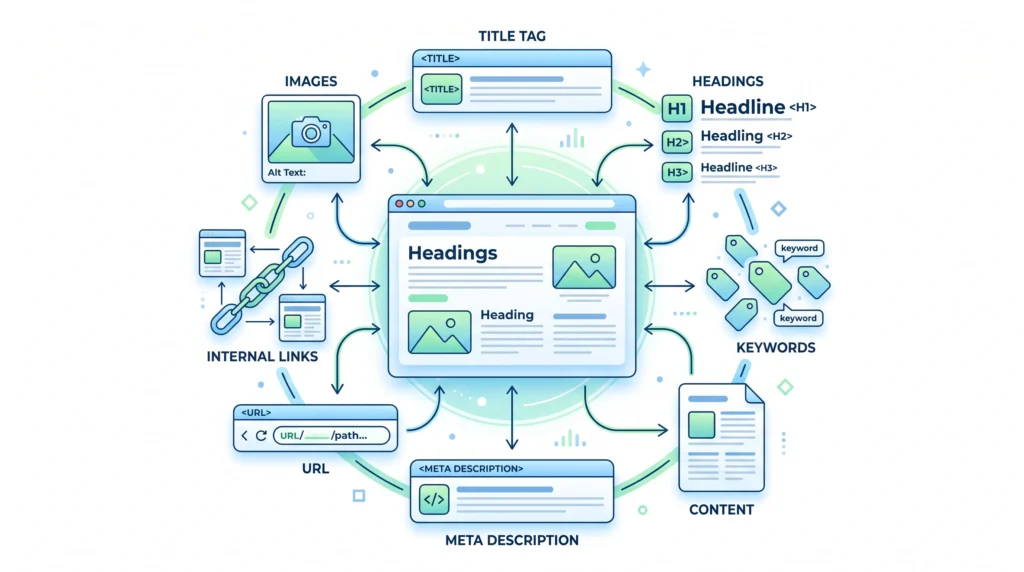
What Does On-Page SEO Mean?
On-page SEO refers to improvements made directly to the pages of your website.
For example, when you improve:
- The content on a page
- The page title
- Heading structure
- Image information
- Internal links
- URL structure
you are working on on-page SEO.
The main idea is to create a page that clearly communicates:
What is this page about?
Who is it useful for?
What question does it answer?
How does it connect to other content on the website?
When these elements are clear, users can navigate the content more easily, and search engines have better signals for understanding the page.
Why Is On-Page SEO Important?
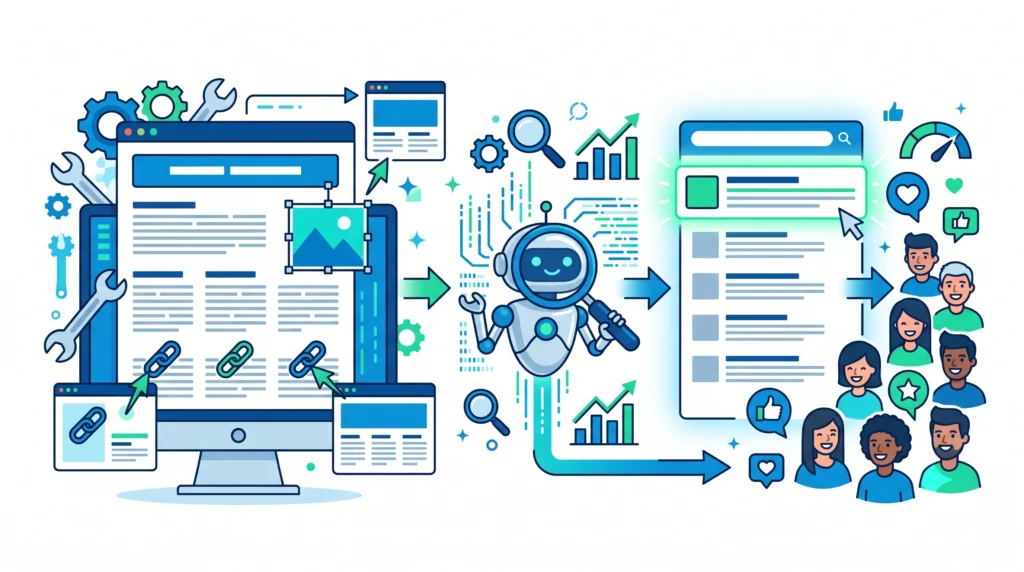
On-page SEO is important because it helps create a stronger connection between:
What people are searching for
↓
What your webpage provides
A well-optimized page can help:
- Communicate the topic clearly
- Match search intent
- Improve content readability
- Help search engines understand page elements
- Create a better user experience
- Connect related pages through internal links
On-page SEO does not guarantee rankings.
However, it provides an important foundation for helping search engines and users understand your content.
On-Page SEO vs Off-Page SEO
On-page SEO and off-page SEO focus on different areas.
| On-Page SEO | Off-Page SEO |
|---|---|
| Improvements made on your website | Activities and signals outside your website |
| Content optimization | Relevant backlinks |
| Titles and meta descriptions | Digital PR |
| Headings and structure | Brand mentions |
| Images and URLs | Content promotion |
| Internal linking | External authority |
Both can support an overall SEO strategy.
A website may have excellent content, but still need authority.
Likewise, a website may earn links but struggle if its pages are poorly structured or don’t satisfy search intent.
The Most Important Elements of On-Page SEO
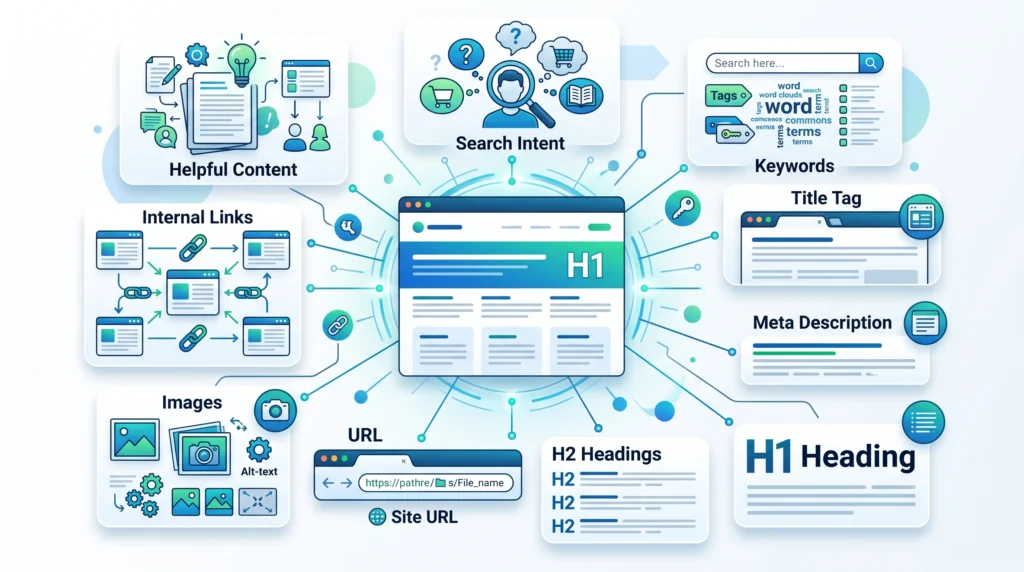
Let’s look at the main elements one by one.
H2 — Content and Search Intent
Content is one of the most important parts of on-page SEO.
Before creating or optimizing a page, ask:
What is the searcher actually trying to find?
This is called search intent.
For example, someone searching:
“What is on-page SEO?”
is likely looking for an explanation.
A useful page should answer questions such as:
- What is on-page SEO?
- Why is it important?
- What elements are included?
- How does it work?
- How can beginners get started?
The page should match the user’s likely goal.
Creating content that does not match search intent can make it difficult to satisfy the reader, even if the page uses the right keyword.
H2 — Keywords and Topic Relevance
Keywords help identify the words and phrases associated with a topic.
For this article, the primary keyword is:
What Is On-Page SEO
Related keywords might include:
- On-page SEO
- On-page optimization
- SEO content optimization
- On-page SEO techniques
However, effective on-page SEO is not about repeating these phrases throughout the page.
Instead:
- Cover the topic thoroughly
- Use relevant language naturally
- Answer related questions
- Organize information clearly
- Avoid unnecessary repetition
Think about the topic first and individual keywords second.
H2 — SEO Titles
An SEO title helps communicate the main topic of a webpage.
For example:
What Is On-Page SEO? Complete Beginner’s Guide
A useful SEO title should generally be:
- Clear
- Relevant
- Descriptive
- Concise
- Aligned with search intent
The title should accurately represent the page.
Avoid titles that promise something the content does not provide.
For a detailed guide, see:
Article 10 — How to Optimize SEO Titles and Meta Descriptions
H2 — Meta Descriptions
A meta description provides a short summary of a webpage.
For example:
Learn what on-page SEO is, why it matters, and how to optimize content, titles, headings, URLs, images, and internal links.
A useful meta description should:
- Summarize the page
- Match search intent
- Explain what the reader can expect
- Use natural language
- Accurately represent the content
Search engines may choose to display a different snippet depending on the search query and page content.
SEO Headings: H1, H2 and H3
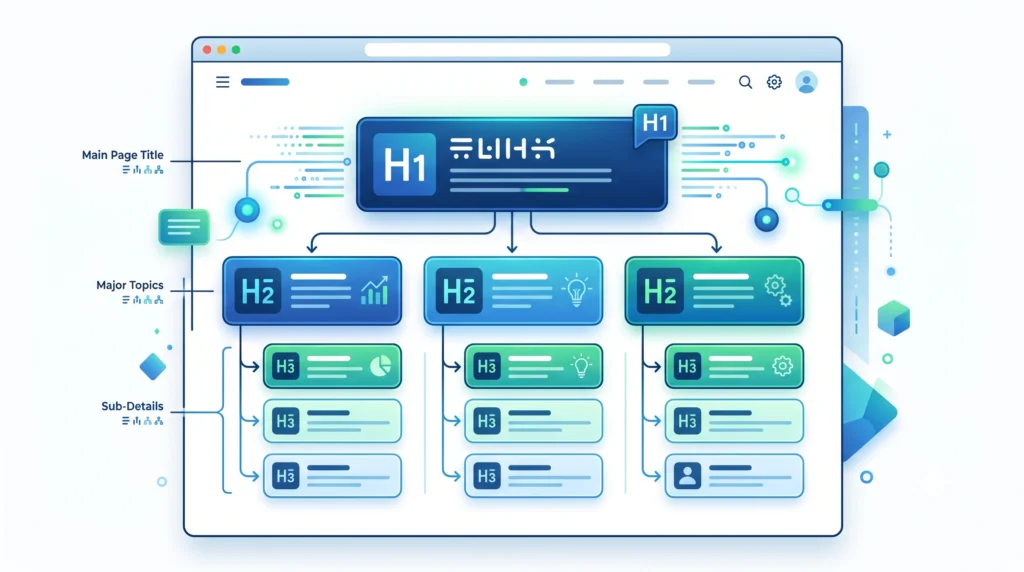
Headings help organize content.
A logical heading structure makes it easier for readers to scan and understand a page.
H1
The H1 usually represents the main topic of the page.
Example:
What Is On-Page SEO?
H2
H2 headings divide the article into major sections.
Examples:
- Why Is On-Page SEO Important?
- SEO Titles
- Meta Descriptions
- Internal Linking
H3
H3 headings divide larger sections into smaller topics.
For example:
H2 — SEO Headings
Then:
H3 — H1
H3 — H2
H3 — H3
A clear hierarchy improves readability and content organization.
For more detail, see:
Article 11 — SEO Headings: H1, H2 and H3 Explained
URL Optimization
A URL should help communicate what a page is about.
For example:
yourwebsite.com/what-is-on-page-seo
This is generally easier to understand than:
yourwebsite.com/page?id=4837
Good URLs are usually:
- Simple
- Descriptive
- Relevant
- Easy to read
Avoid adding unnecessary words or repeatedly forcing keywords into URLs.
Image Optimization
Images can make content easier to understand and more engaging.
However, images should also be optimized appropriately.
Consider:
- Using relevant images
- Choosing suitable file formats
- Compressing large files when appropriate
- Using descriptive filenames
- Adding useful alt text when relevant
Alt text should describe the image for accessibility and context.
It should not be used to stuff keywords.
For example:
Weak Alt Text:
On-page SEO on-page SEO SEO optimization
Better Alt Text:
On-page SEO elements including headings content images and internal links
Internal Linking
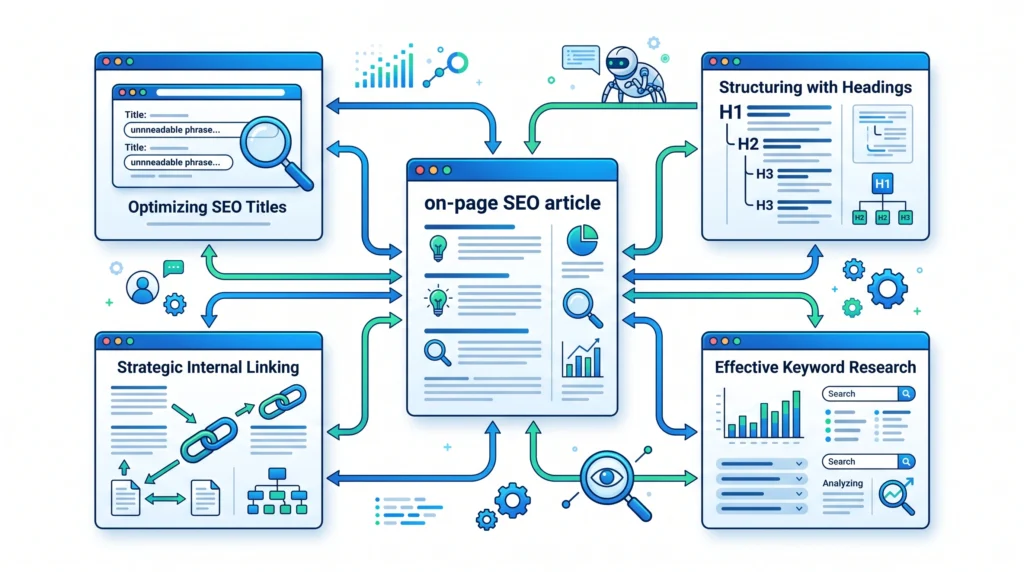
Internal links connect one page on your website to another.
For example, this article can link to:
- SEO titles and meta descriptions
- SEO headings
- Internal linking
- Keyword research
- Search intent
These links help readers discover related information.
They can also help search engines discover pages and understand how content is connected.
Good internal links should be:
- Relevant
- Useful
- Natural
- Descriptive
For a complete explanation, see:
Article 12 — Internal Linking: Complete SEO Guide
How to Optimize a Page for On-Page SEO
A simple process can help beginners optimize a webpage.
Step 1: Understand the Topic
Clearly define what the page should cover.
Step 2: Research Keywords
Find the main topic, related terms, and questions people ask.
Step 3: Analyze Search Intent
Understand what the searcher expects to find.
Step 4: Create Helpful Content
Write content that directly answers the user’s needs.
Step 5: Write a Clear SEO Title
Create a descriptive title that reflects the content.
Step 6: Add a Useful Meta Description
Summarize the page clearly.
Step 7: Organize the Content With Headings
Use H1, H2, and H3 headings logically.
Step 8: Optimize URLs and Images
Keep URLs simple and use relevant images with useful descriptions.
Step 9: Add Internal Links
Connect the page to relevant articles on your website.
Step 10: Review and Improve
Check readability, accuracy, relevance, and overall usefulness before publishing.
Common On-Page SEO Mistakes
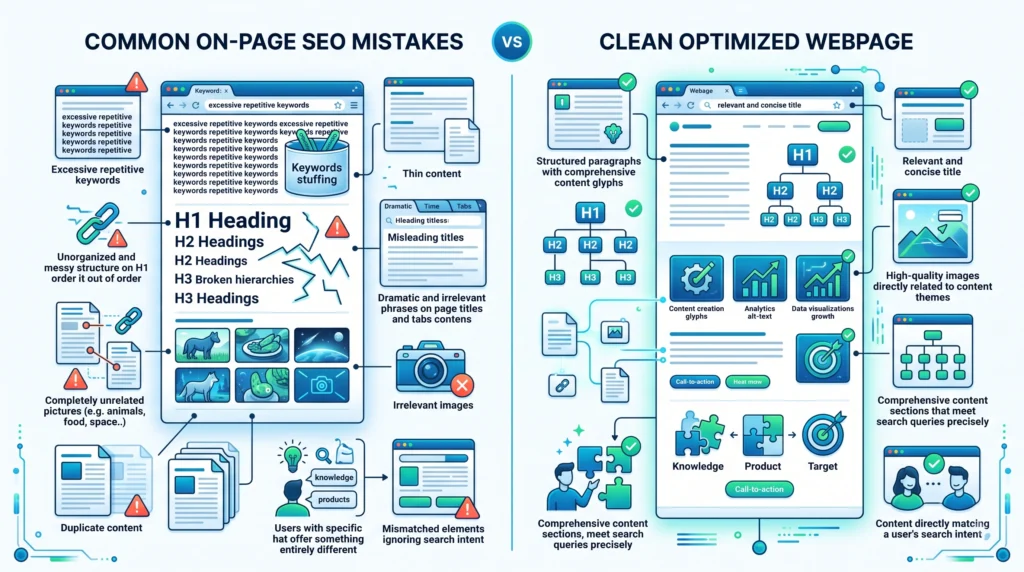
Keyword Stuffing
Repeating keywords excessively can make content unnatural.
Ignoring Search Intent
A page should address what the searcher actually wants.
Weak or Confusing Headings
Headings should help organize the content.
Misleading SEO Titles
Your title should accurately represent the page.
Missing Internal Links
Relevant links can help readers discover related content.
Using Irrelevant Images
Images should support the content instead of simply filling space.
Creating Content With Little Value
Avoid publishing thin content that does not provide meaningful information.
On-Page SEO Checklist
Before publishing a page, check:
Content
- Content matches search intent
- Topic is clearly explained
- Content answers relevant questions
- Information is easy to understand
Keywords
- Primary keyword is relevant
- Related terms are used naturally
- No keyword stuffing
SEO Title and Meta Description
- SEO title clearly describes the page
- Meta description summarizes the content
- Both match search intent
Headings
- One clear H1
- Logical H2 sections
- H3 headings used where appropriate
URLs
- URL is simple and descriptive
- No unnecessary parameters where avoidable
Images
- Images are relevant
- File sizes are reasonable
- Filenames are descriptive
- Alt text is useful where appropriate
Internal Links
- Related pages are linked naturally
- Anchor text is descriptive
- Links provide value to the reader
Frequently Asked Questions
What Is On-Page SEO in Simple Words?
On-page SEO is the process of improving elements within a webpage, such as content, titles, headings, images, URLs, and internal links, to make the page easier for users and search engines to understand.
What Is the Difference Between On-Page and Off-Page SEO?
On-page SEO focuses on improvements made within your website, while off-page SEO focuses on activities and signals outside your website, such as earning relevant backlinks and building authority.
Are Keywords Still Important for On-Page SEO?
Yes. Keywords can help identify relevant topics and search language, but they should be used naturally. Understanding search intent and providing useful content are equally important.
How Many Keywords Should I Use on a Page?
There is no fixed number. Focus on covering the topic naturally rather than repeating a keyword to reach a specific count.
Is On-Page SEO Enough to Rank?
On-page SEO is important, but rankings can also depend on factors such as technical accessibility, competition, relevance, authority, and the overall quality of the search results.
What Is the Most Important Part of On-Page SEO?
There is no single element that guarantees success. Helpful content that matches search intent is one of the most important foundations.
Do Meta Descriptions Affect Rankings?
Meta descriptions are generally not considered a direct ranking factor. Their primary role is to summarize the page and potentially influence how the result is presented to searchers.
Final Thoughts
On-page SEO is about making every webpage as clear, relevant, useful, and well-organized as possible.
The process can be summarized as:
Understand the Topic
↓
Research Relevant Keywords
↓
Identify Search Intent
↓
Create Helpful Content
↓
Optimize Titles and Meta Descriptions
↓
Organize Content With Headings
↓
Optimize URLs and Images
↓
Add Relevant Internal Links
↓
Review and Improve
Don’t think of on-page SEO as a checklist of tricks.
Think of it as the process of improving the quality, clarity, and usefulness of every important page on your website.
When you consistently create content that answers real questions and organize it logically, you build a stronger foundation for both users and search engines.
Related Articles
Article 10:
How to Optimize SEO Titles and Meta Descriptionsseo-title-meta-description
Article 11:
SEO Headings: H1, H2 and H3 Explainedseo-headings
Article 12:
Internal Linking: Complete SEO Guideinternal-linking
Pillar 2 — Keyword Research:
What Is Keyword Research?what-is-keyword-research
Article 7:
What Is Search Intent?search-intent
Internal Linking Suggestions
Naturally link this article to:
- What Is SEO?
- What Is Keyword Research?
- What Is Search Intent?
- How to Optimize SEO Titles and Meta Descriptions
- SEO Headings: H1, H2 and H3 Explained
- Internal Linking: Complete SEO Guide
Recommended anchor text:
- SEO basics
- keyword research
- search intent
- SEO titles and meta descriptions
- SEO headings
- internal linking
Also link this article back to the main Pillar 3 — On-Page SEO page.
Publishing Checklist
- H1 clearly labelled
- H2 headings clearly labelled
- H3 headings clearly labelled
- SEO title prepared
- Meta title prepared
- Meta description prepared
- URL slug prepared
- Focus keyword included naturally
- Secondary keywords used naturally
- Positive words included naturally
- Caution words included naturally
- On-page SEO definition included
- Importance explained
- On-page vs off-page comparison included
- Main on-page SEO elements explained
- Search intent explained
- Keywords explained
- SEO titles explained
- Meta descriptions explained
- Headings explained
- URLs explained
- Images explained
- Internal linking explained
- Step-by-step optimization process included
- Common mistakes included
- On-page SEO checklist included
- FAQs included
- Image placements marked
- Image prompts included
- Image filenames included
- Alt text included
- Internal linking suggestions included
- No keyword stuffing
- No guaranteed ranking claims
- Beginner-friendly language used
- Content is easy to scan
- Content provides genuine value
