

Robots.txt is a file that provides instructions to search engine crawlers about which parts of a website they can or cannot crawl.
It is one of the basic elements of technical SEO.
A robots.txt file is usually located in the root directory of a website. For example:
Website owners can use robots.txt to manage crawler access to certain areas of their websites.
For example, you may not want search engine crawlers to spend time crawling:
- Internal search result pages
- Certain administrative areas
- Temporary sections
- Specific parameter-based URLs
- Other unnecessary website sections
However, robots.txt must be used carefully.
An incorrect configuration can accidentally block search engines from crawling important pages or resources.
In simple terms:
Robots.txt helps provide crawling instructions, but it does not automatically control whether a page is indexed or ranked.

What Is Robots.txt?
Robots.txt is a text file that provides instructions to automated crawlers.
These instructions can help communicate which parts of a website should not be crawled by specific bots.
The file typically uses directives such as:
User-agentDisallowAllowSitemap
A basic example might look like this:
User-agent: *Disallow: /admin/
This example communicates an instruction to crawlers covered by the rule that the /admin/ section should not be crawled.
The * symbol generally represents all user agents covered by that rule.
Robots.txt rules can become more complex depending on the website and crawler.
Where Is the Robots.txt File Located?

A robots.txt file is generally located at the root of a website’s domain.
For example:
It is important that the file is placed in the correct location.
A file located at:
would not normally serve as the site’s main robots.txt file.
Search engine crawlers look for the robots.txt file at the root location of the relevant website host.
How Does Robots.txt Work?
The basic process looks like this:
A search engine crawler visits a website
↓
The crawler checks for the robots.txt file
↓
The crawler reads the applicable instructions
↓
The crawler determines which areas it can attempt to crawl
Robots.txt can provide different instructions for different crawlers.
For example, rules can be written for:
- All supported crawlers
- A specific search engine crawler
- Another specific automated user agent
The effectiveness of a robots.txt rule depends on the crawler and whether it follows the applicable standard and instructions.
Important Robots.txt Directives
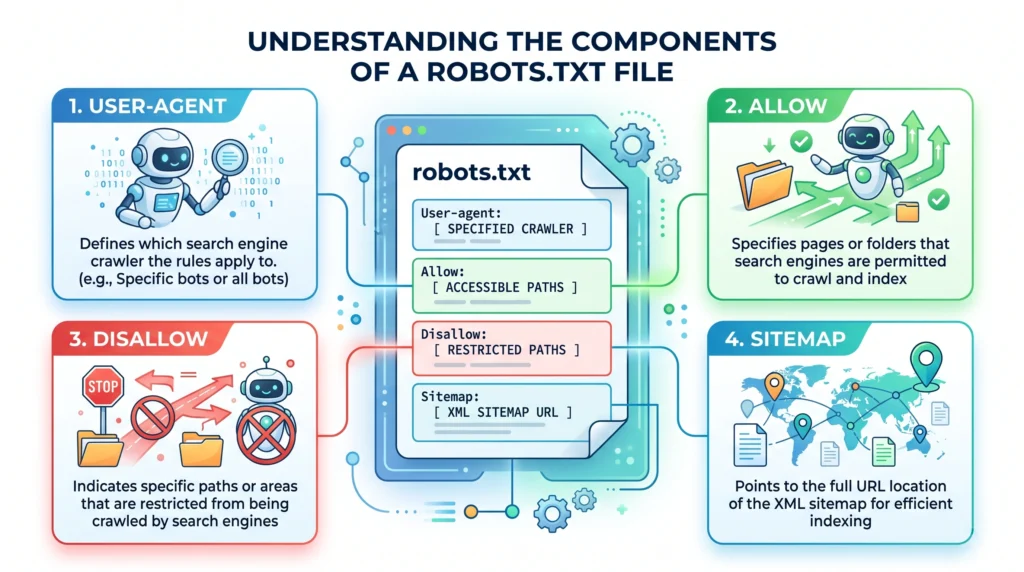
Let’s look at the most common directives.
User-agent
The User-agent directive identifies the crawler to which a set of instructions applies.
For example:
User-agent: *
This rule is intended to apply to all relevant user agents covered by the wildcard.
A rule can also target a specific crawler.
Disallow
The Disallow directive can be used to communicate that a crawler should not crawl a particular path.
Example:
User-agent: *Disallow: /private/
This instructs applicable crawlers not to crawl the /private/ section.
Be careful when using broad rules.
For example, an incorrect directive could unintentionally restrict access to important website content.
Allow
The Allow directive can be used in supported configurations to provide access to a specific path within a broader restricted section.
For example:
User-agent: *Disallow: /private/Allow: /private/public-page/
The exact interpretation of rules can depend on the crawler.
Always test important configurations before relying on them.
Sitemap
A robots.txt file can also reference an XML sitemap.
For example:
Sitemap: https://example.com/sitemap.xml
This provides search engines with the location of the XML sitemap.
The sitemap can help support the discovery of important URLs.
Robots.txt vs Noindex: What Is the Difference?
One of the most important concepts in technical SEO is understanding that:
Crawling and indexing are not the same thing.
Robots.txt primarily provides instructions related to crawling.
A noindex directive is used to communicate that a page should not be included in a search engine’s index.
Here is a simplified comparison:
| Robots.txt | Noindex |
|---|---|
| Primarily relates to crawling | Relates to indexing |
| Can restrict crawler access to a path | Communicates that a page should not be indexed |
| Does not guarantee removal from search results | Intended to control indexing |
| Can affect whether crawlers access page content | Usually requires the search engine to process the applicable directive |
A common mistake is assuming:
“If I block a page in robots.txt, it will definitely disappear from search results.”
That is not a reliable assumption.
Crawling controls and indexing controls should be managed separately and carefully.
When Should You Use Robots.txt?

Robots.txt can be useful when you want to manage crawler access to sections that do not need to be crawled.
Possible examples include:
Administrative Sections
Certain administrative areas may not need to be crawled.
Internal Search Pages
Internal search results can sometimes generate large numbers of URLs that provide little value in search results.
Certain Parameter-Based URLs
Some websites generate many unnecessary URL variations through filters or parameters.
Temporary or Non-Public Areas
Certain areas may not need crawler access.
However, robots.txt is not a security tool.
Do not rely on robots.txt to protect sensitive or private information.
If content must be private, use proper authentication and access controls.
When Should You Not Use Robots.txt?
Robots.txt should not be used simply because you do not want a page to rank.
For example, if your goal is to prevent a page from being indexed, you may need a more appropriate indexing control.
You should also avoid using robots.txt to:
- Hide sensitive information
- Protect private files
- Replace proper website security
- Block important pages accidentally
- Fix duplicate content without understanding canonicalization
- Solve every indexing problem
Robots.txt is a crawler management tool, not a universal SEO solution.
Robots.txt and SEO Crawling
Robots.txt can influence which areas crawlers are instructed not to access.
This can be useful for large websites with many unnecessary URLs.
For example, imagine a website generates thousands of internal search pages.
Allowing crawlers to spend unnecessary resources exploring those pages may not be useful.
In some situations, managing crawler access can help focus crawling attention on more important website sections.
However, there is no guarantee that blocking certain URLs will automatically increase crawling of other pages.
The goal should be to reduce unnecessary crawling issues while maintaining access to important content.
Common Robots.txt Examples
Here are some simplified examples.
Allow Crawling
User-agent: *Disallow:
This example does not list a restricted path for the applicable user agents.
Block a Specific Folder
User-agent: *Disallow: /private/
This provides an instruction not to crawl URLs within that path.
Reference an XML Sitemap
User-agent: *Disallow:Sitemap: https://example.com/sitemap.xml
This allows the robots file to provide a sitemap location.
Block One Area but Allow a Specific Page
User-agent: *Disallow: /private/Allow: /private/example-page/
Rule interpretation may depend on the crawler, so configurations should be tested carefully.
Common Robots.txt Mistakes
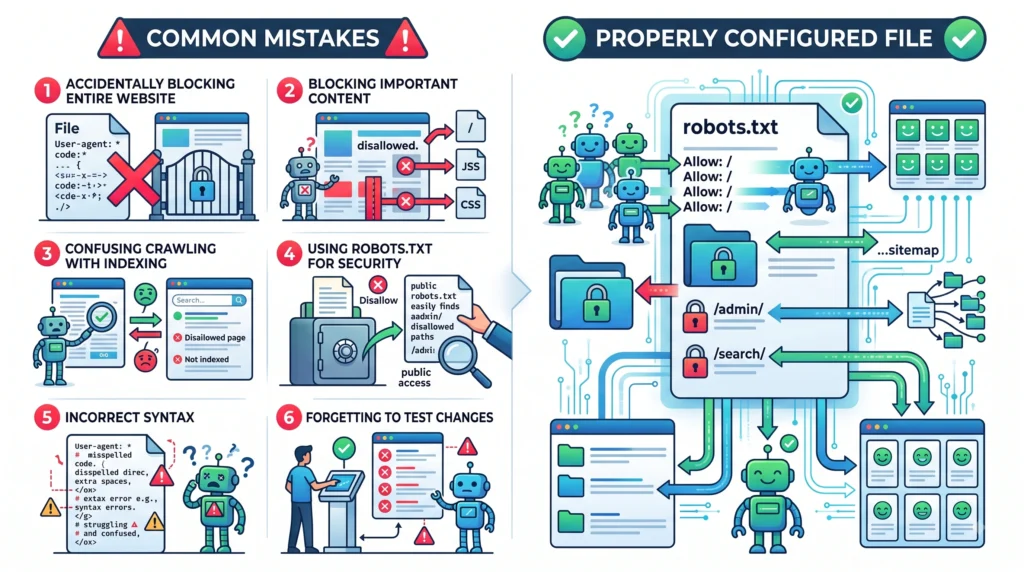
Accidentally Blocking the Entire Website
One of the most serious mistakes is using an overly broad rule that prevents crawlers from accessing important sections.
Always review changes before publishing them.
Blocking Important Pages
A single incorrect path can prevent crawlers from accessing valuable articles, products, or landing pages.
Confusing Crawling With Indexing
Blocking crawling does not automatically guarantee that a page cannot appear in search results.
Understand the difference between crawler controls and indexing controls.
Using Robots.txt for Security
Robots.txt files are publicly accessible.
Do not use them to hide sensitive information.
Incorrect Syntax
Small formatting errors can create unexpected results.
Always validate and test the file where possible.
Forgetting About Important Resources
Some websites rely on resources such as JavaScript or CSS for proper rendering.
Incorrectly blocking essential resources may affect how a page is processed.
How to Create a Robots.txt File
A basic process looks like this.
Step 1: Identify Unnecessary Crawl Areas
Determine whether your website has sections that search engines do not need to crawl.
Do not block pages without a clear reason.
Step 2: Identify Important Content
Make sure your valuable pages remain accessible.
Examples include:
- Important articles
- Product pages
- Service pages
- Category pages
- Pillar pages
Step 3: Create the File
Create a plain text file named:
robots.txt
Add the appropriate instructions.
Step 4: Add the File to the Root Directory
The file should generally be accessible at:
Step 5: Add Your Sitemap Location
Where appropriate, include a reference to your XML sitemap.
For example:
Sitemap: https://yourwebsite.com/sitemap.xml
Step 6: Test Before Making Major Changes
Review the file carefully.
Make sure important pages and resources are not unintentionally restricted.
Step 7: Monitor Your Website
After changes, continue monitoring crawling and indexing behavior.
Technical SEO should be reviewed regularly as the website changes.
How to Check Your Robots.txt File

You can usually check whether a robots.txt file exists by visiting:
Review the file for:
- Unexpected
Disallowrules - Incorrect paths
- Important pages being restricted
- Incorrect formatting
- Sitemap references
- Outdated instructions
If your website uses a CMS, plugin, or server-level configuration, the robots.txt file may be generated or managed automatically.
Always understand where the active robots.txt configuration is coming from before making changes.
Robots.txt Best Practices
A useful robots.txt strategy should generally follow these principles.
Keep Important Content Accessible
Do not accidentally restrict valuable pages.
Use Clear and Specific Rules
Avoid unnecessarily broad restrictions.
Do Not Use Robots.txt for Security
Private information should be protected using proper authentication.
Understand Crawling vs Indexing
Use the appropriate method depending on whether you want to manage crawling or indexing.
Reference Your XML Sitemap
Where appropriate, include your sitemap location.
Test Before Publishing
Small mistakes can have significant consequences.
Review the File Regularly
Website changes can make older rules unnecessary or incorrect.
Robots.txt Checklist
Before finalizing your robots.txt file, check:
Crawl Access
- Important pages are not accidentally blocked
- Important website resources remain accessible where needed
- Unnecessary crawl areas are clearly identified
- Rules are specific and intentional
Technical Accuracy
- File is named
robots.txt - File is located at the website root
- Syntax has been reviewed
- User-agent rules are appropriate
- Disallow rules are correct
- Allow rules are reviewed where applicable
Sitemap
- XML sitemap location is referenced where appropriate
- Sitemap URL is correct
Security
- Robots.txt is not being used to protect private information
- Sensitive content uses proper access controls
Maintenance
- Important website changes trigger a review
- Old or unnecessary rules are removed
- Crawling and indexing issues are monitored
Frequently Asked Questions
What Is Robots.txt in Simple Words?
Robots.txt is a text file that provides instructions to search engine crawlers about which parts of a website they should or should not crawl.
Does Robots.txt Block Indexing?
Not necessarily. Robots.txt primarily relates to crawling. Crawling and indexing are separate processes.
Can I Use Robots.txt to Hide a Private Page?
No. Robots.txt is not a security tool and should not be used to protect sensitive or private information.
Where Is Robots.txt Located?
It is generally located at the root of a website, such as:
Should Every Website Have a Robots.txt File?
Not every website needs complex crawling restrictions. However, a correctly configured robots.txt file can be useful for communicating crawler instructions and referencing an XML sitemap.
Can a Wrong Robots.txt File Hurt SEO?
Yes. Incorrect rules can accidentally prevent search engines from crawling important pages or resources.
What Is the Difference Between Robots.txt and an XML Sitemap?
Robots.txt provides crawler instructions, while an XML sitemap provides search engines with information about important URLs.
Can I Add My XML Sitemap to Robots.txt?
Yes. A robots.txt file can include a sitemap reference, such as:
Sitemap: https://example.com/sitemap.xml
Final Thoughts
Robots.txt is a useful technical SEO file, but it should be used carefully.
The key idea is simple:
Use robots.txt to manage crawler access—not to hide sensitive information or solve every indexing problem.
A healthy approach looks like this:
Identify important content
↓
Keep valuable pages accessible
↓
Identify unnecessary crawl areas
↓
Create clear and specific rules
↓
Reference your XML sitemap where appropriate
↓
Test the configuration
↓
Monitor the website regularly
When used correctly, robots.txt can support a cleaner and more organized crawling strategy.
When used incorrectly, it can create serious accessibility problems.
That is why every change should be intentional, reviewed, and tested before being treated as part of your permanent technical SEO setup.
Related Articles
Article 13:
What Is Technical SEO?what-is-technical-seo
Article 14:
Crawling and Indexing: Complete Guidecrawling-indexing
Article 15:
XML Sitemap: Complete Guidexml-sitemap
Related Article:
How Do Search Engines Work?how-do-search-engines-work
Internal Linking Suggestions
Naturally link this article to:
- What Is Technical SEO?
- Crawling and Indexing: Complete Guide
- XML Sitemap: Complete Guide
- How Do Search Engines Work?
- Canonical URLs Guide
- Internal Linking: Complete SEO Guide
Recommended anchor text:
- technical SEO
- crawling and indexing
- XML sitemap
- robots.txt file
- search engine crawlers
- canonical URLs
- internal linking
- crawlability
Also link this article back to the main Pillar 4 — Technical SEO page.
Publishing Checklist
- H1 clearly labelled
- H2 headings clearly labelled
- H3 headings clearly labelled
- SEO title prepared
- Meta title prepared
- Meta description prepared
- URL slug prepared
- Focus keyword included naturally
- Secondary keywords used naturally
- Positive words included naturally
- Caution words included naturally
- Robots.txt definition included
- File location explained
- How robots.txt works explained
- User-agent directive explained
- Disallow directive explained
- Allow directive explained
- Sitemap directive explained
- Crawling vs indexing explained
- Appropriate use cases included
- Incorrect use cases included
- Example configurations included
- Common mistakes included
- Step-by-step creation process included
- Best practices included
- Robots.txt checklist included
- FAQs included
- Image placements marked
- Image prompts included
- Image filenames included
- Alt text included
- Internal linking suggestions included
- No keyword stuffing
- No guaranteed crawling claims
- No guaranteed indexing claims
- No guaranteed ranking claims
- Beginner-friendly language used
- Content is easy to scan
- Content provides genuine value
