

An XML sitemap is a file that helps search engines discover important pages on your website.
It contains a list of URLs that you want search engines to know about and, in some cases, additional information related to those URLs.
An XML sitemap can be particularly useful for websites that have:
- Many pages
- Complex website structures
- Frequently updated content
- New pages that may not have many internal links
- Large collections of articles, products, or other content
However, an XML sitemap is not a shortcut to higher rankings.
It does not guarantee that every URL will be crawled, indexed, or ranked.
Instead, its main purpose is to provide search engines with an additional way to discover important content.
In simple terms:
An XML sitemap is like a roadmap that helps search engines find the important pages on your website.

What Is an XML Sitemap?
An XML sitemap is a structured file that lists important URLs from a website.
The term XML stands for Extensible Markup Language, which is a format used to organize information in a machine-readable way.
Search engines can use this file as an additional source of information about the pages on your website.
A simplified sitemap might contain URLs such as:
- Homepage
- Category pages
- Important articles
- Product pages
- Service pages
For example:
https://example.com/
https://example.com/what-is-seo/
https://example.com/keyword-research/
https://example.com/technical-seo/
The sitemap helps communicate that these URLs exist and may be important pages on the website.
However, simply adding a URL to an XML sitemap does not guarantee that search engines will index it.
Why Is an XML Sitemap Important for SEO?

An XML sitemap can support SEO by helping search engines discover important URLs.
This can be useful when:
- Your website has a large number of pages
- Some pages are difficult to discover
- Your website structure is complex
- New content is published regularly
- Important pages have limited external links
A sitemap can provide another discovery pathway.
However, it should work alongside a strong internal linking strategy.
The ideal approach is:
Logical Website Structure
Relevant Internal Links
An Accurate XML Sitemap
A sitemap should support your website architecture, not replace it.
H2 — How Does an XML Sitemap Work?
The process can be simplified into a few steps.
H3 — Step 1: Important URLs Are Added
Your sitemap contains URLs that you consider important for search engines to discover.
H3 — Step 2: Search Engines Access the Sitemap
Search engines may access the sitemap directly or through a submitted sitemap location.
H3 — Step 3: URLs Can Be Discovered
The sitemap provides search engines with a list of URLs that may need to be crawled.
H3 — Step 4: Search Engines Decide What to Crawl
Search engines determine when and how URLs are crawled.
H3 — Step 5: Pages Are Evaluated for Indexing
After crawling and processing, a page may or may not be selected for indexing.
The important distinction is:
Sitemap inclusion does not guarantee crawling.
And:
Crawling does not guarantee indexing.
And:
Indexing does not guarantee rankings.
H2 — XML Sitemap vs HTML Sitemap
An XML sitemap and an HTML sitemap serve different purposes.
| XML Sitemap | HTML Sitemap |
|---|---|
| Primarily designed for search engines | Primarily designed for website visitors |
| Uses XML format | Uses standard webpage format |
| Lists important URLs in a structured file | Provides clickable links |
| Supports search engine discovery | Supports user navigation |
| Usually not part of the main website navigation | Can be accessed by users through a webpage |
An XML sitemap is mainly a technical SEO resource.
An HTML sitemap can be useful for helping visitors discover and navigate content.
Some websites may use both.
What Pages Should Be Included in an XML Sitemap?

Generally, an XML sitemap should focus on URLs that are important and intended to be indexed.
These may include:
- Homepage
- Important category pages
- Pillar pages
- Valuable blog articles
- Product pages
- Service pages
- Other important landing pages
The URLs should generally be:
- Accessible
- Canonical
- Relevant
- Useful
- Intended for indexing
For example, if your SEO website contains an important article called:
What Is Technical SEO?
Then the canonical version of:
yourwebsite.com/what-is-technical-seo/
may be an appropriate URL for the sitemap.
What Pages Should Not Be Included in an XML Sitemap?
Not every URL on a website needs to be included.
Avoid adding unnecessary or problematic URLs where possible.
Examples may include:
- Pages returning errors
- Redirect URLs
- Duplicate URLs
- Non-canonical URLs
- Pages blocked from indexing
- Low-value pages
- Internal search result pages
- Temporary pages
- Unnecessary parameter URLs
Adding thousands of unnecessary URLs to a sitemap does not automatically make the sitemap more useful.
A cleaner sitemap that focuses on important pages can provide a clearer picture of the content you want search engines to discover.
XML Sitemap and Canonical URLs
A sitemap should generally contain the preferred canonical version of a page.
For example, imagine the same content can be accessed through multiple URLs:
https://example.com/page
/https://www.example.com/page/
http://example.com/page/
https://example.com/page?source=example
Ideally, your website should clearly manage which version is the preferred canonical URL.
The XML sitemap should generally reference that preferred version.
Including multiple duplicate versions can create unnecessary complexity.
Consistency is important across:
- Internal links
- Canonical tags
- XML sitemaps
- Preferred website URLs
XML Sitemap and Crawling
An XML sitemap can help search engines discover URLs.
However, it is important to understand that a sitemap does not control the entire crawling process.
Search engines decide:
- Whether to crawl a URL
- When to crawl it
- How frequently to revisit it
The sitemap is simply an additional source of information.
Strong internal linking remains important.
A page that appears in your sitemap but has no meaningful connection to the rest of your website may still indicate a weak website structure.
XML Sitemap and Indexing
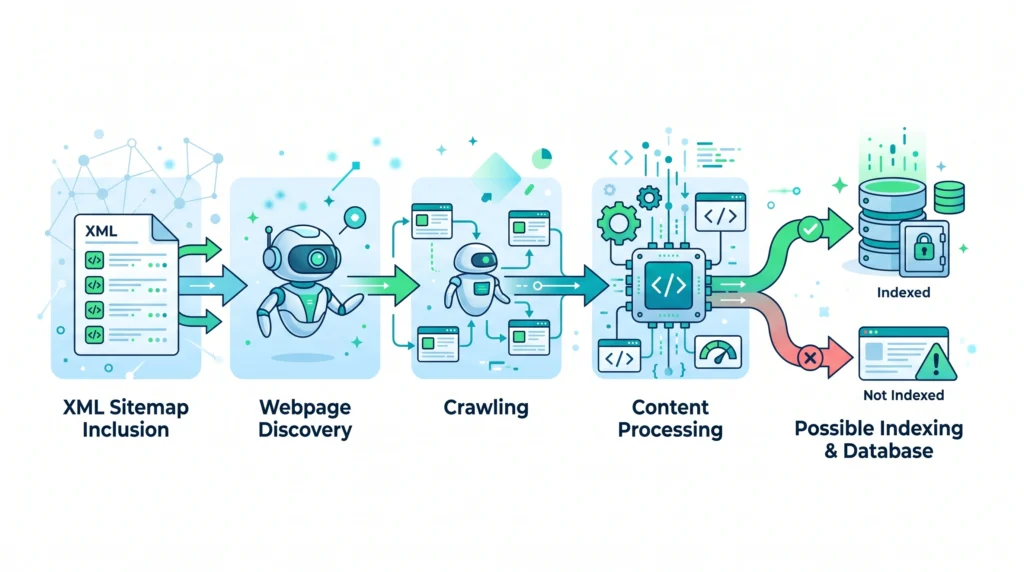
Adding a URL to an XML sitemap does not force a search engine to index that page.
A page may still remain unindexed because of issues such as:
- Duplicate content
- Noindex directives
- Canonicalization signals
- Limited unique value
- Technical accessibility problems
Therefore, when troubleshooting an indexing problem, adding the page to a sitemap may not be enough.
You should also review the page’s:
- Content quality
- Internal links
- Technical accessibility
- Canonical signals
- Indexing directives
How to Create an XML Sitemap
The exact process depends on your website platform.
Many modern website platforms and SEO tools can automatically generate XML sitemaps.
A general process looks like this:
Step 1: Identify Important Pages
Determine which URLs should be discoverable and intended for indexing.
Step 2: Generate the Sitemap
You can create the sitemap manually for a small website or use a CMS, plugin, or SEO tool to generate it automatically.
Step 3: Review the URLs
Check for:
- Broken pages
- Redirects
- Duplicate URLs
- Non-canonical URLs
- Pages not intended for indexing
Step 4: Make the Sitemap Accessible
The sitemap should be available at a consistent URL.
A common location may look similar to:
yourwebsite.com/sitemap.xml
The exact location can vary depending on the platform and website setup.
Step 5: Submit or Reference the Sitemap
You can provide search engines with information about your sitemap through appropriate search engine tools or website configuration.
Step 6: Monitor the Sitemap
Review your sitemap regularly as the website grows and changes.
How to Find Your XML Sitemap

Many websites use common sitemap locations, such as:
https://example.com/sitemap.xml
However, sitemap locations can vary.
A sitemap may also be referenced inside the website’s robots file.
For example, a robots file may include a reference to the sitemap location.
The exact structure depends on the website platform and configuration.
How Often Should an XML Sitemap Be Updated?
Your sitemap should reflect the important pages currently available on your website.
If you publish new content regularly, your sitemap may need to update regularly.
Many modern CMS platforms can update sitemaps automatically.
You should review your sitemap after major website changes, such as:
- Large content migrations
- URL structure changes
- Website redesigns
- Removing major sections
- Changing domain structures
An outdated sitemap may continue listing pages that no longer exist.
Regular maintenance can help prevent unnecessary problems.
Common XML Sitemap Mistakes
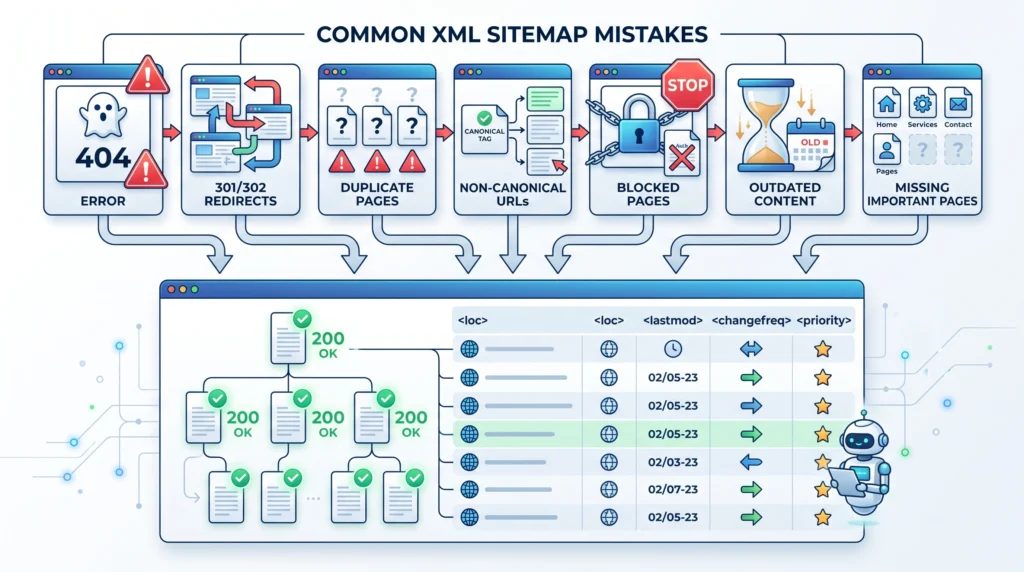
Including Every URL
A sitemap should focus on important pages, not every possible URL generated by your website.
Including Redirect URLs
Redirected URLs generally do not need to remain in the sitemap.
Including Error Pages
Pages returning errors should be reviewed rather than included as important sitemap URLs.
Including Non-Canonical Versions
Use the preferred canonical version of each important page.
Forgetting New Important Pages
Important new content should be represented appropriately.
Keeping Removed Pages
Old URLs that no longer exist should not remain unnecessarily in the sitemap.
Treating the Sitemap as a Ranking Tool
An XML sitemap helps with discovery. It does not guarantee rankings or traffic.
XML Sitemap Best Practices
A useful XML sitemap should generally be:
Accurate
Include URLs that actually exist and are important.
Clean
Avoid unnecessary, duplicate, broken, or redirected URLs.
Updated
Keep the sitemap aligned with the current website structure.
Consistent
Use preferred canonical URLs.
Accessible
Make sure search engines can access the sitemap.
Supported by Internal Links
Do not rely on the sitemap as the only way to discover important content.
XML Sitemap Checklist
Before considering your XML sitemap complete, review the following.
URLs
- Important pages are included
- URLs return appropriate responses
- Broken pages are removed
- Redirect URLs are excluded where appropriate
- Duplicate URLs are avoided
- Preferred canonical URLs are used
Indexing
- Included pages are intended for indexing
- Important pages are not accidentally blocked
- Noindex pages are reviewed before inclusion
Maintenance
- Sitemap reflects the current website
- New important pages are added
- Removed pages are reviewed
- Major migrations trigger a sitemap review
Website Structure
- Important pages have relevant internal links
- Sitemap supports, rather than replaces, website navigation
- Content is logically organized
Frequently Asked Questions
What Is an XML Sitemap in Simple Words?
An XML sitemap is a file that lists important URLs on your website and helps search engines discover those pages.
Do All Websites Need an XML Sitemap?
An XML sitemap can be useful for many websites, especially larger, newer, or more complex websites. Small websites with excellent internal linking may have fewer discovery challenges, but maintaining an accurate sitemap can still be beneficial.
Does an XML Sitemap Improve Rankings?
An XML sitemap does not guarantee higher rankings. Its primary purpose is to support the discovery of important URLs.
Does Submitting a Sitemap Guarantee Indexing?
No. Search engines can discover URLs through a sitemap, but each page is evaluated separately for crawling and indexing.
Should I Include Noindex Pages in My Sitemap?
Generally, an XML sitemap should focus on important pages intended for indexing. Review noindex pages carefully before including them.
Should I Include Redirect URLs in My Sitemap?
Generally, the preferred destination URL should be considered instead of keeping redirected URLs in the sitemap.
Where Is an XML Sitemap Usually Located?
A common location is:
yourwebsite.com/sitemap.xml
However, the exact location depends on your website platform and configuration.
How Often Should I Update My Sitemap?
The sitemap should reflect your current important pages. Many platforms update it automatically, but major website changes should trigger a review.
Final Thoughts
An XML sitemap is an important supporting element of technical SEO.
It can help search engines discover important content, but it works best as part of a larger SEO foundation.
Think of the process like this:
Create Useful Content
↓
Organize Your Website Clearly
↓
Connect Important Pages With Internal Links
↓
Include Important Canonical URLs in Your XML Sitemap
↓
Allow Search Engines to Discover and Process the Content
↓
Monitor and Maintain the Website
The key principle is simple:
Your XML sitemap should represent the important, accessible, canonical, and indexable pages of your website.
Do not treat it as a magic SEO tool.
Instead, use it as a reliable roadmap that supports your overall website structure and helps search engines discover valuable content.
Related Articles
Article 13:
What Is Technical SEO?what-is-technical-seo
Article 14:
Crawling and Indexing: Complete Guidecrawling-indexing
Related Article:
How Do Search Engines Work?how-do-search-engines-work
Related Article:
Internal Linking: Complete SEO Guideinternal-linking
Internal Linking Suggestions
Naturally link this article to:
- What Is Technical SEO?
- Crawling and Indexing: Complete Guide
- How Do Search Engines Work?
- Internal Linking: Complete SEO Guide
- Robots.txt Guide
- Canonical URLs Guide
- Website Architecture
Recommended anchor text:
- technical SEO
- crawling and indexing
- XML sitemap
- how search engines discover pages
- internal linking
- robots.txt
- canonical URLs
- website architecture
Also link this article back to the main Pillar 4 — Technical SEO page.
Publishing Checklist
- H1 clearly labelled
- H2 headings clearly labelled
- H3 headings clearly labelled
- SEO title prepared
- Meta title prepared
- Meta description prepared
- URL slug prepared
- Focus keyword included naturally
- Secondary keywords used naturally
- Positive words included naturally
- Caution words included naturally
- XML sitemap definition included
- Importance for SEO explained
- How XML sitemaps work explained
- XML vs HTML sitemap comparison included
- Pages to include explained
- Pages to exclude explained
- Canonical URLs explained
- Crawling relationship explained
- Indexing relationship explained
- Sitemap creation process included
- Sitemap maintenance explained
- Common mistakes included
- Best practices included
- XML sitemap checklist included
- FAQs included
- Image placements marked
- Image prompts included
- Image filenames included
- Alt text included
- Internal linking suggestions included
- No keyword stuffing
- No guaranteed indexing claims
- No guaranteed ranking claims
- Beginner-friendly language used
- Content is easy to scan
- Content provides genuine value
