

Crawling and indexing are two essential processes that help search engines discover, process, and organize webpages.
Before a webpage can have an opportunity to appear in relevant organic search results, a search engine generally needs to discover and understand it.
This process can be simplified as:
Discovery → Crawling → Processing → Indexing → Ranking
Although these stages are connected, they are not the same thing.
A webpage can be crawled but not indexed.
A page can also be technically accessible but still not appear in search results for a particular query.
In simple terms:
Crawling is how search engines discover and access webpages, while indexing is the process of analyzing and potentially storing information about those pages in a search engine’s index.
Understanding this difference is an important part of technical SEO.

What Is Crawling?
Crawling is the process through which search engines discover and access webpages.
Search engines use automated programs, often called crawlers, bots, or spiders, to request webpages and analyze their content.
A crawler may discover a new page through:
- Internal links
- External links
- XML sitemaps
- Previously known URLs
- Other website discovery signals
For example, imagine you publish a new article.
If that article is linked from another page on your website, a search engine may eventually follow that link and discover the new URL.
The crawler can then request the page and begin processing its content.
Crawling is therefore the first major step in making a page discoverable.
How Do Search Engines Discover Webpages?
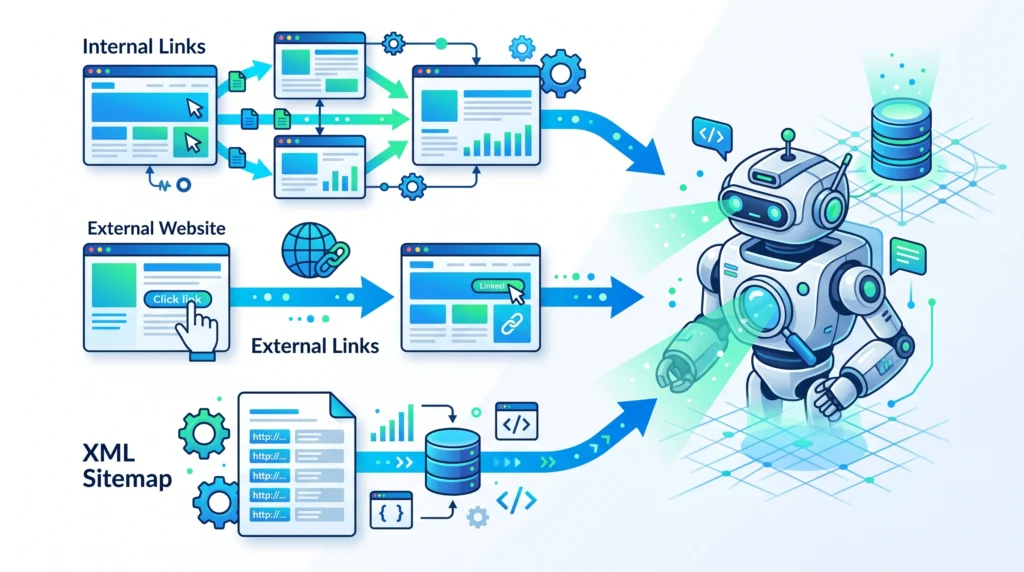
Search engines need a way to find URLs before they can crawl them.
The most common discovery methods include the following.
Internal Links
Internal links connect pages within the same website.
For example:
Homepage → Technical SEO → Crawling and Indexing Guide
This creates a pathway that can help both users and search engines discover the article.
A page with no meaningful internal links may be more difficult to discover.
Such pages are sometimes referred to as orphan pages.
External Links
A search engine may also discover a page through a link from another website.
If another website links to a new page on your site, that link can potentially provide a discovery path.
XML Sitemaps
An XML sitemap can provide search engines with information about important URLs on your website.
However, including a page in a sitemap does not guarantee that the page will be crawled or indexed.
What Is Indexing?
Indexing happens after a search engine has accessed and processed a webpage.
During this process, the search engine analyzes information about the page and may store it in its index.
A search engine index can be thought of as a very large database of information about webpages.
However, an important distinction is:
Crawled does not always mean indexed.
A search engine may crawl a page but decide not to include it in its index.
Possible reasons can include:
- Duplicate or highly similar content
- Low-value content
- Incorrect technical settings
- Canonicalization issues
- Accessibility problems
- Pages that provide little unique value
The goal is not necessarily to get every URL indexed.
Instead, website owners should focus on making important and useful pages accessible and understandable.
Crawling vs Indexing: What Is the Difference?
The difference can be explained simply:
| Crawling | Indexing |
|---|---|
| Discovering and accessing a webpage | Processing and potentially storing information about the webpage |
| Search engine bots request the page | Search engines analyze the page |
| Can happen without indexing | Usually requires the page to be processed |
| Helps search engines find content | Helps make content eligible for consideration in search results |
A useful way to remember it is:
Crawling = Finding and visiting
Indexing = Understanding and storing
Both processes are important for SEO.
How Crawling and Indexing Work Together
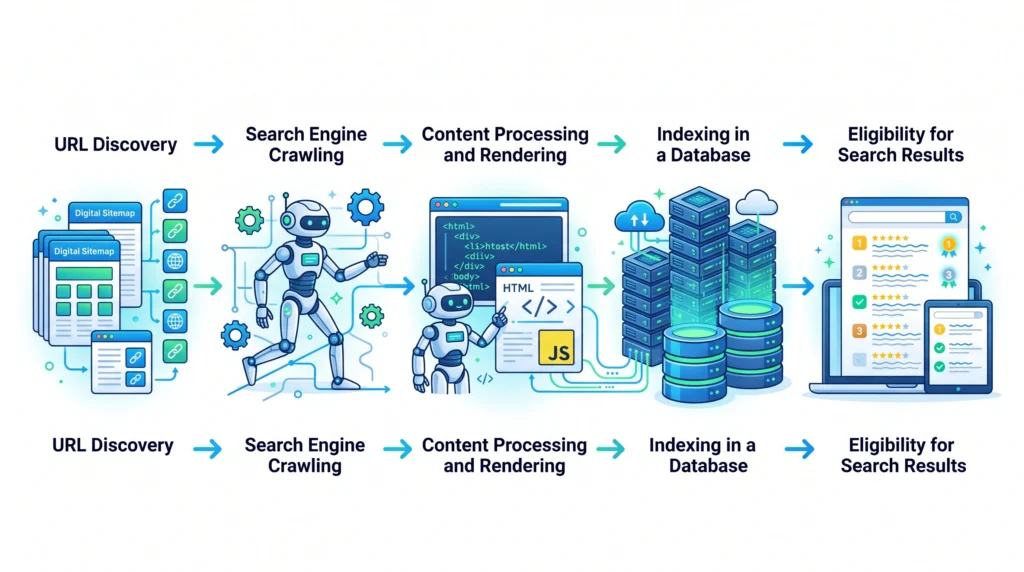
The overall process can look like this:
Step 1: A URL Is Discovered
The search engine learns that the webpage exists.
This may happen through an internal link, external link, sitemap, or previously known URL.
Step 2: The Page Is Crawled
A search engine bot requests the webpage and related resources.
Step 3: The Page Is Processed
The search engine analyzes the content and other information associated with the page.
Modern webpages may also require resources such as scripts to be processed or rendered.
Step 4: The Page Is Evaluated for Indexing
The search engine determines whether and how the page may be included in its index.
Step 5: The Page May Become Eligible for Relevant Searches
If indexed, the page may be considered when relevant searches occur.
However, indexing does not guarantee high rankings or visibility for every query.
What Is Crawlability?
Crawlability refers to whether search engine crawlers can access and process a webpage.
A page may have crawlability problems if:
- Crawlers are blocked
- Important resources cannot be accessed
- Internal links are missing
- The server returns errors
- Website architecture is confusing
- Technical configurations are incorrect
For example, a valuable article may exist on your website, but if it is accidentally blocked from crawlers, search engines may have difficulty accessing it.
Crawlability is therefore an important technical SEO consideration.
What Is Indexability?
Indexability refers to whether a webpage is eligible to be included in a search engine’s index.
A page may be crawlable but intentionally or unintentionally prevented from being indexed.
Common factors that can affect indexability include:
- Noindex directives
- Canonical signals
- Duplicate content
- Content quality
- Technical accessibility
- Page purpose and usefulness
Crawlability and indexability should be evaluated separately.
A page can be:
Crawlable + Indexable
or
Crawlable + Not Indexable
or, in some situations, affected by other technical restrictions.
Common Reasons Pages Are Not Indexed
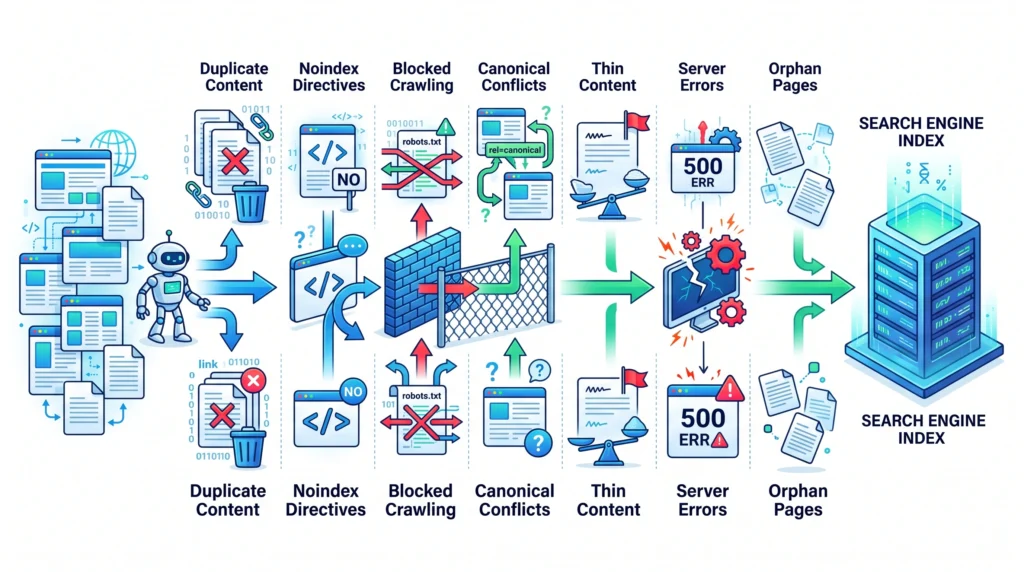
There are many possible reasons why a page may not appear in a search engine’s index.
The Page Is New
Newly published pages may need time to be discovered and processed.
The Page Has No Internal Links
If no other pages link to an important page, discovery may be more difficult.
Crawling Is Restricted
Incorrect robots-related settings can limit crawler access.
The Page Has a Noindex Directive
A noindex directive can indicate that a page should not be included in the search index.
Duplicate or Similar Content
Search engines may choose a different version when multiple pages contain very similar information.
Canonicalization Issues
Incorrect canonical signals can create confusion about which URL should be treated as the primary version.
Technical Errors
Server errors or inaccessible pages can prevent proper processing.
Limited Unique Value
Pages that provide little unique or useful information may not be selected for indexing.
The Role of Internal Linking in Crawling
Internal links are important because they create pathways between pages.
For example:
Technical SEO
↓
Crawling and Indexing
↓
XML Sitemaps
↓
Robots.txt Guide
This structure can help users navigate related topics.
It can also make important content easier for search engines to discover.
Good internal linking should be:
- Relevant
- Logical
- Useful for the reader
- Descriptive
- Naturally placed
Avoid adding links only for the purpose of manipulating search engines.
The primary goal should be to help users discover useful related content.
How XML Sitemaps Support Crawling
An XML sitemap provides search engines with a list of important URLs.
A sitemap can be especially useful when:
- Your website is large
- Your website has many pages
- New content is added regularly
- Some pages may not be easily discovered through navigation
However, a sitemap should not replace good website architecture.
The strongest approach is usually to combine:
Logical Internal Linking
Clear Website Structure
An XML Sitemap for Important URLs
A sitemap should generally contain URLs that are:
- Important
- Accessible
- Canonical
- Intended for indexing
Robots.txt and Crawling
Robots.txt is a file that can provide instructions for crawlers about certain areas of a website.
It can be useful for managing crawler access.
However, incorrect use can create serious SEO problems.
For example, accidentally restricting important website sections may prevent crawlers from accessing valuable content.
It is important to understand that controlling crawling and controlling indexing are not exactly the same thing.
A page may be affected differently depending on how technical directives are configured.
Always review robots-related settings carefully before making major changes.
Noindex and Indexing
A noindex directive is used to communicate that a page should not be included in a search engine’s index.
There are valid reasons to use noindex.
For example, some pages may not be intended to appear in search results.
However, accidentally applying noindex to an important article can prevent that page from being indexed.
When troubleshooting indexing problems, check whether the page is unintentionally using a noindex directive.
Canonical URLs and Indexing

Canonicalization helps communicate which version of a page is preferred when similar or duplicate URLs exist.
For example, a website may accidentally create multiple versions of similar content through:
- URL parameters
- Filter pages
- Sorting options
- HTTP and HTTPS versions
- WWW and non-WWW versions
Proper canonical management can reduce unnecessary confusion.
However, a canonical signal does not replace the need for useful website architecture and consistent URL management.
How to Improve Crawling and Indexing
A beginner-friendly process can help improve the technical foundation of your website.
Step 1: Identify Important Pages
Make a list of the pages that matter most.
These may include:
- Important articles
- Category pages
- Product pages
- Service pages
- Main pillar pages
Step 2: Check Internal Links
Make sure important pages are connected to relevant pages within your website.
Step 3: Review Crawl Restrictions
Check that important pages are not accidentally blocked.
Step 4: Review Indexing Controls
Make sure important pages are not unintentionally marked with noindex directives.
Step 5: Check Canonical URLs
Review whether the preferred URL version is communicated consistently.
Step 6: Improve Content Quality
Make sure important pages provide useful and unique value.
Step 7: Review Your XML Sitemap
Ensure important canonical pages are represented appropriately.
Step 8: Fix Technical Errors
Identify server errors, broken pages, and other accessibility issues.
Step 9: Monitor Changes
Technical SEO requires ongoing monitoring as websites grow and change.
Common Crawling and Indexing Mistakes
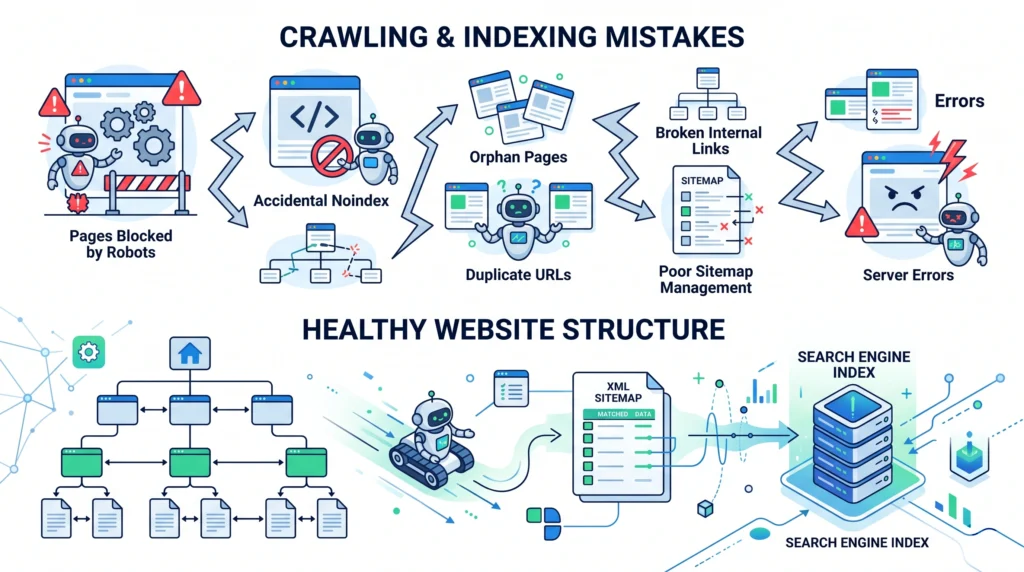
Assuming Every Published Page Will Be Indexed
Publishing a page does not guarantee indexing.
Creating Orphan Pages
Important pages should have meaningful internal links.
Blocking Important Content
Incorrect technical configurations can prevent crawlers from accessing important pages.
Using Noindex Incorrectly
Always verify that important pages are eligible for indexing.
Ignoring Duplicate Content
Similar pages can create unnecessary complexity.
Relying Only on XML Sitemaps
Sitemaps support discovery but do not replace logical internal linking.
Ignoring Technical Errors
Broken or inaccessible pages should be identified and addressed.
Expecting Instant Indexing
Search engine discovery and processing can take time, and website owners cannot guarantee an exact indexing timeline.
Crawling and Indexing Checklist
Before considering your crawling and indexing foundation healthy, check the following.
Discovery
- Important pages have relevant internal links
- Important pages are included in the site structure
- XML sitemap contains appropriate URLs
Crawling
- Important pages are not accidentally blocked
- Important resources are accessible
- Important URLs return appropriate responses
Indexing
- Important pages are intended for indexing
- Important pages are not accidentally marked noindex
- Canonical signals are reviewed
- Duplicate pages are managed appropriately
Content
- Important pages provide useful information
- Content is unique where appropriate
- Pages clearly serve a purpose
Technical Health
- Broken links are reviewed
- Server errors are monitored
- Website structure remains logical
- Technical settings are checked regularly
Frequently Asked Questions
What Is the Difference Between Crawling and Indexing?
Crawling is the process of discovering and accessing webpages, while indexing involves analyzing and potentially storing information about those pages in a search engine’s index.
Can a Page Be Crawled but Not Indexed?
Yes. A search engine can access and process a page without deciding to include it in its index.
How Do Search Engines Discover New Pages?
Search engines can discover pages through internal links, external links, XML sitemaps, and previously known URLs.
Why Is My Page Not Indexed?
There can be many reasons, including technical restrictions, duplicate content, canonicalization issues, limited unique value, accessibility problems, or the page simply being new and not yet processed.
Does an XML Sitemap Guarantee Indexing?
No. An XML sitemap can help search engines discover important URLs, but it does not guarantee that every page will be crawled or indexed.
Does Robots.txt Prevent Indexing?
Robots.txt primarily provides crawling instructions. Crawling and indexing are separate concepts, so website owners should understand how different technical controls interact.
How Can I Help Search Engines Find My Pages?
Use a logical website structure, add relevant internal links, maintain an appropriate XML sitemap, and ensure important pages are technically accessible.
Does Indexing Guarantee Rankings?
No. Being indexed means a page may be eligible for consideration in search results. It does not guarantee a particular ranking or amount of traffic.
Final Thoughts
Crawling and indexing are fundamental parts of how search engines interact with websites.
The process can be summarized as:
Search engines discover your page
↓
Crawlers access the page
↓
The content is processed
↓
The page may be indexed
↓
The page can be considered for relevant searches
For beginners, the most important focus should be making sure that valuable pages are:
Discoverable
Accessible
Crawlable
Indexable where appropriate
Logically connected
Useful and unique
Crawling and indexing are not about forcing every page into search results.
They are about creating a technically healthy website where important content can be discovered and understood without unnecessary barriers.
A strong foundation of internal linking, logical website architecture, useful content, correct technical settings, and ongoing monitoring can help support that goal.
Related Articles
Article 13:
What Is Technical SEO?what-is-technical-seo
Related Article:
How Do Search Engines Work?how-do-search-engines-work
Related Article:
Internal Linking: Complete SEO Guideinternal-linking
Pillar 1 — SEO Basics:
What Is SEO?what-is-seo
Internal Linking Suggestions
Naturally link this article to:
- What Is Technical SEO?
- How Do Search Engines Work?
- What Is SEO?
- Internal Linking: Complete SEO Guide
- XML Sitemap Guide
- Robots.txt Guide
- Canonical URLs
- Website Architecture
Recommended anchor text:
- technical SEO
- how search engines work
- crawling and indexing
- internal linking
- XML sitemap
- robots.txt
- canonical URLs
- website architecture
Also link this article back to the main Pillar 4 — Technical SEO page.
Publishing Checklist
- H1 clearly labelled
- H2 headings clearly labelled
- H3 headings clearly labelled
- SEO title prepared
- Meta title prepared
- Meta description prepared
- URL slug prepared
- Focus keyword included naturally
- Secondary keywords used naturally
- Positive words included naturally
- Caution words included naturally
- Crawling clearly explained
- Indexing clearly explained
- Crawling vs indexing comparison included
- Page discovery methods explained
- Crawlability explained
- Indexability explained
- Internal linking explained
- XML sitemaps explained
- Robots.txt explained
- Noindex explained
- Canonical URLs explained
- Common indexing problems included
- Beginner improvement steps included
- Crawling and indexing checklist included
- FAQs included
- Image placements marked
- Image prompts included
- Image filenames included
- Alt text included
- Internal linking suggestions included
- No keyword stuffing
- No guaranteed indexing claims
- No guaranteed ranking claims
- Beginner-friendly language used
- Content is easy to scan
- Content provides genuine value
